Saltar navegación

[Resuelto] Remove meta information heading.

This support ticket is created 4 years, 6 months ago. There's a good chance that you are reading advice that it now obsolete.

This is the technical support forum for Toolset - a suite of plugins for developing WordPress sites without writing PHP.

Everyone can read this forum, but only Toolset clients can post in it. Toolset support works 6 days per week, 19 hours per day.

Sun Mon Tue Wed Thu Fri Sat
9:00 – 13:00 9:00 – 13:00 9:00 – 13:00 9:00 – 13:00 - - 9:00 – 13:00
14:00 – 18:00 14:00 – 18:00 14:00 – 18:00 14:00 – 18:00 - - 14:00 – 18:00

Zona horaria del colaborador: Africa/Casablanca (GMT+01:00)

Etiquetado: 

Este tema contiene 2 respuestas, tiene 2 mensajes.

Última actualización por davidv-14 4 years, 6 months ago.

Asistido por: Jamal.

Autor
Mensajes
#2229735
Screenshot_7.jpg

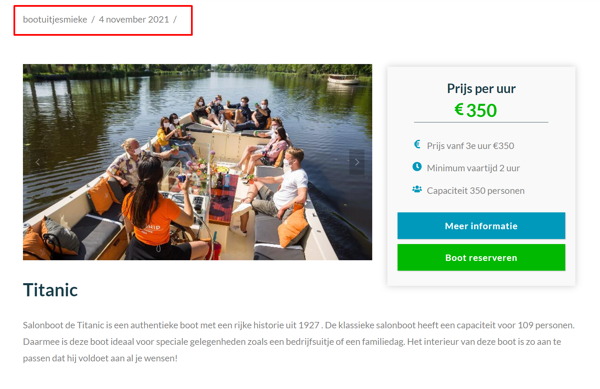
I want to remove the date and author from our dynamic template. See image

#2229771

Hello and thank you for contacting the Toolset support.

I visited the following page from your site to inspect its code, and it seems that this heading is added by the theme, rather than a Toolset content template. enlace oculto
Keep in mind that Toolset content templates will replace the output of the_content function in the theme's templates. Read more about it here
- https://developer.wordpress.org/reference/functions/the_content/
- https://developer.wordpress.org/themes/basics/template-hierarchy/

Usually the themes offer an option or a hook, to hide or show its parts(like the meta information heading), check the theme's options for that. or reach out to the theme's support for assistance.

In the meantime, you can hide this heading using some custom CSS. Add the following CSS to the content template's CSS section:

header.entry-header {
    display: none;
}

I hope this helps. Let me know if you have any questions.

#2229835

My issue is resolved now. Thank you!