Saltar navegación

[Resuelto] Hiding Certain Text on Toolset View

Este hilo está resuelto. Aquí tiene una descripción del problema y la solución.

Problem:

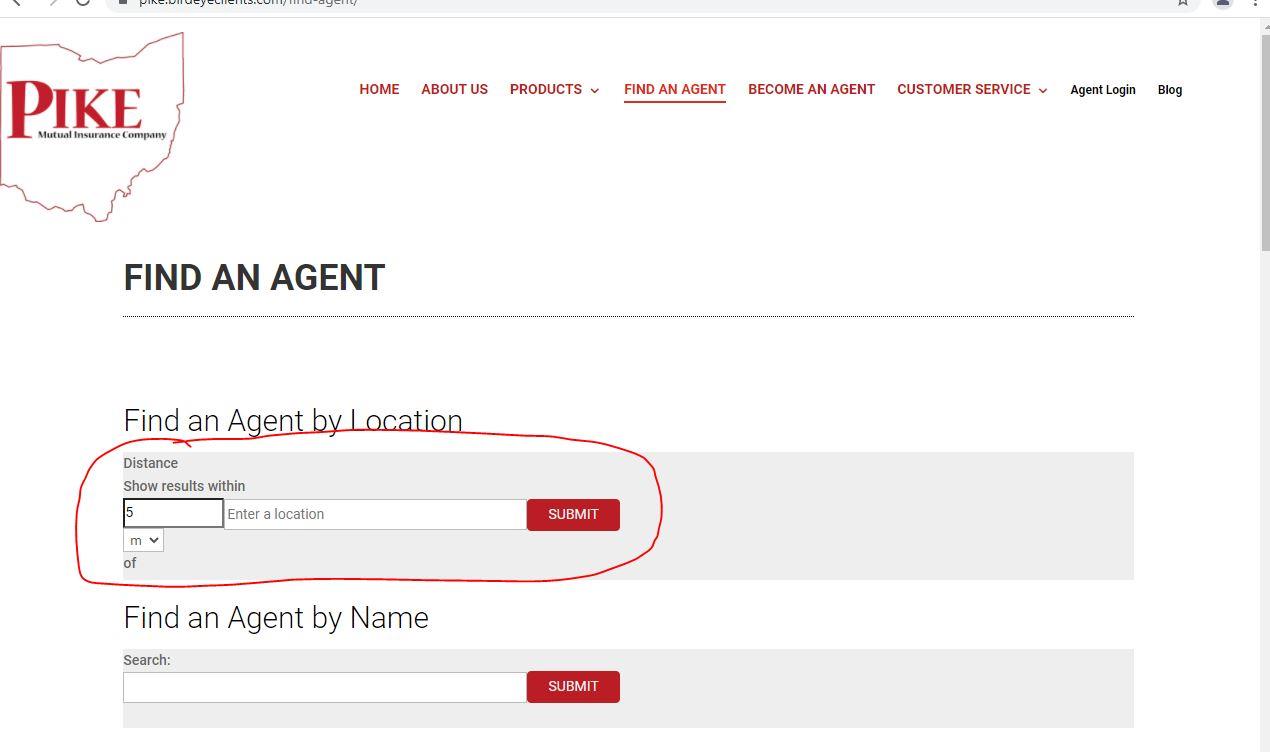
The user wanted to show the different fields for the distance search filter in a single line.

Solution:

Shared some custom CSS code for this.

Relevant Documentation:

n/a

This support ticket is created 4 years, 6 months ago. There's a good chance that you are reading advice that it now obsolete.

This is the technical support forum for Toolset - a suite of plugins for developing WordPress sites without writing PHP.

Everyone can read this forum, but only Toolset clients can post in it. Toolset support works 6 days per week, 19 hours per day.

Sun Mon Tue Wed Thu Fri Sat
- 9:00 – 13:00 9:00 – 13:00 9:00 – 13:00 9:00 – 13:00 9:00 – 13:00 -
- 14:00 – 18:00 14:00 – 18:00 14:00 – 18:00 14:00 – 18:00 14:00 – 18:00 -

Zona horaria del colaborador: Asia/Karachi (GMT+05:00)

Este tema contiene 4 respuestas, tiene 2 mensajes.

Última actualización por josiahM-2 4 years, 6 months ago.

Asistido por: Waqar.

Autor
Mensajes
#2223399
Website Updates emailed 11_17_2021 (002).jpg

On this page enlace oculto We need to hide or move the "mi" to be in between the the two search fields, and we need to hide the word "of" as well.

We are currently using the following code to control the display styling. We are using Divi Theme.

.wp-block-toolset-views-view-template-block.wpv-block-loop-item.php-to-be-replaced-with-shortcode{
background-color: #F7F7F7;
border: 1px solid #d7d7d7;
min-height:200px;
padding-left:15px;
}

a.tb-button__link, input.wpv-submit-trigger.js-wpv-submit-trigger{
background-color:#bb1d25 !important;
font-family: 'Roboto';
font-size: 14px;
text-transform: uppercase;
}

h2.tb-heading{
font-size:18px;
font-weight:bold;
margin-top:50px;
}

.wp-block-toolset-views-custom-search-filter.wpv-custom-search-filter.wpv-custom-search-filter-label-top{
background-color:#eeeee!important;
}

input.btn.js-toolset-maps-distance-current-location{
display:none;
}

input#toolset-maps-distance-value, input#toolset-maps-distance-center{
line-height:1.5em;
font-family: 'Roboto';
font-size: 14px;
}

input#toolset-maps-distance-value{
width: 25%;
line-height: 1.9em;
display:flex;
float:left;
}

.form-group{
padding-bottom:25px;
}

select#toolset-maps-distance{
width:10%;
}

input#toolset-maps-distance-center{
width:75%;
margin-left: 25%;
line-height: 1.8em;
margin-top: -5.45em;
}

input.wpv-submit-trigger.js-wpv-submit-trigger{
float: left;
margin-top: -57px;
margin-left: 40%;
}

span.wpv-custom-search-filter__input{
width:40%;
}

.wp-block-toolset-views-custom-search-filter.wpv-custom-search-filter.wpv-custom-search-filter-label-top{
padding-bottom: -60px;
}

input.js-wpv-filter-trigger-delayed.form-control{
width: 100%;
line-height: 1.9em;
}

.wp-block-toolset-views-custom-search-filter.wpv-custom-search-filter.wpv-custom-search-filter-label-top, .wpv-custom-search-filter-submit{
background-color:#eeeeee;
}
.wpv-custom-search-filter-submit{
margin-bottom:30px;
}

header .mobile_menu_bar:before {
color: #bb1d25;
}

#2223761

Hi,

Thank you for contacting us and I'd be happy to assist.

Can you please share temporary admin login details and remove any custom CSS code added to customize the layout of these distance search fields?

I'll be in a better position to suggest the next steps, accordingly.

Note: Your next reply will be private and it is recommended to make a complete backup copy, before sharing the access details.

regards,
Waqar

#2224843

Thank you for sharing these details.

As there is not much control available on the output of the distance search filter, it would be very difficult to make it look exactly like the example page. But, you can use some additional custom CSS code, to make all fields appear in a single line so that the design is more consistent.
( screenshot: enlace oculto )


.wp-block-toolset-views-custom-search-container {
    overflow: hidden;
    margin: 0 auto 3em;
}

.wpv-custom-search-filter-label-top .wpv-custom-search-filter__label[for='distance'] {
    display: none;
}

.wpv-custom-search-filter-label-top .wpv-custom-search-filter__input {
    flex: auto;
    display: inline-block;
    width: 65%;
}

.wpv-custom-search-filter-label-top .form-group {
    display:block;
    text-align: left;
    padding: 1.25em 2em !important;
}

.wpv-custom-search-filter-label-top .form-group input,
.wpv-custom-search-filter-label-top .form-group select {
    border: 1px solid;
    line-height: 1.8em !important;
    font-size: 14px !important;
    padding: 0.25em 0.5em;
}

.wpv-custom-search-filter-label-top .form-group select {
 padding: 0.5em 0.5em;
}

.wpv-custom-search-filter-label-top .js-toolset-maps-distance-unit {
    display: inline-block;
}

.wpv-custom-search-filter-label-top input#toolset-maps-distance-value {
    width: 12%;
    line-height: 1.9em;
    display: inline-block;
    float: none;
}

.wpv-custom-search-filter-label-top select#toolset-maps-distance {
    width: 10%;
    display: inline-block;
}

.wpv-custom-search-filter-label-top input#toolset-maps-distance-center {
    width: 53%;
    margin-left: 0%;
    line-height: 1.8em;
    margin-top: 0;
    display: inline-block;
}

.wpv-custom-search-filter-submit {
    margin-top: -4.75em !important;
    float: right;
    width: 35%;
}

.wpv-custom-search-filter-submit .wpv-submit-trigger {
    float: left !important;
    margin: 0 !important;
}

.wpv-custom-search-filter-label-top:nth-of-type(3) .form-group {
    padding: 2.5em 2em !important;
}

.wpv-custom-search-filter-label-top:nth-of-type(3) .form-group input[type='text'] {
    width: 90%;
}

I hope this helps and for more personalized assistance around custom code, you can also consider hiring a professional from our list of recommended contractors:
https://toolset.com/contractors/

#2224965

Thank you so much!!!!

#2224967

My issue is resolved now. Thank you!