Saltar navegación

[Resuelto] Custom Search Filter

This is the technical support forum for Toolset - a suite of plugins for developing WordPress sites without writing PHP.

Everyone can read this forum, but only Toolset clients can post in it. Toolset support works 6 days per week, 19 hours per day.

Sun Mon Tue Wed Thu Fri Sat
- 10:00 – 13:00 10:00 – 13:00 10:00 – 13:00 10:00 – 13:00 10:00 – 13:00 -
- 14:00 – 18:00 14:00 – 18:00 14:00 – 18:00 14:00 – 18:00 14:00 – 18:00 -

Zona horaria del colaborador: Asia/Kolkata (GMT+05:30)

Este tema contiene 6 respuestas, tiene 1 mensaje.

Última actualización por Minesh 1 day, 21 hours ago.

Asistido por: Minesh.

Autor
Mensajes
#2863143
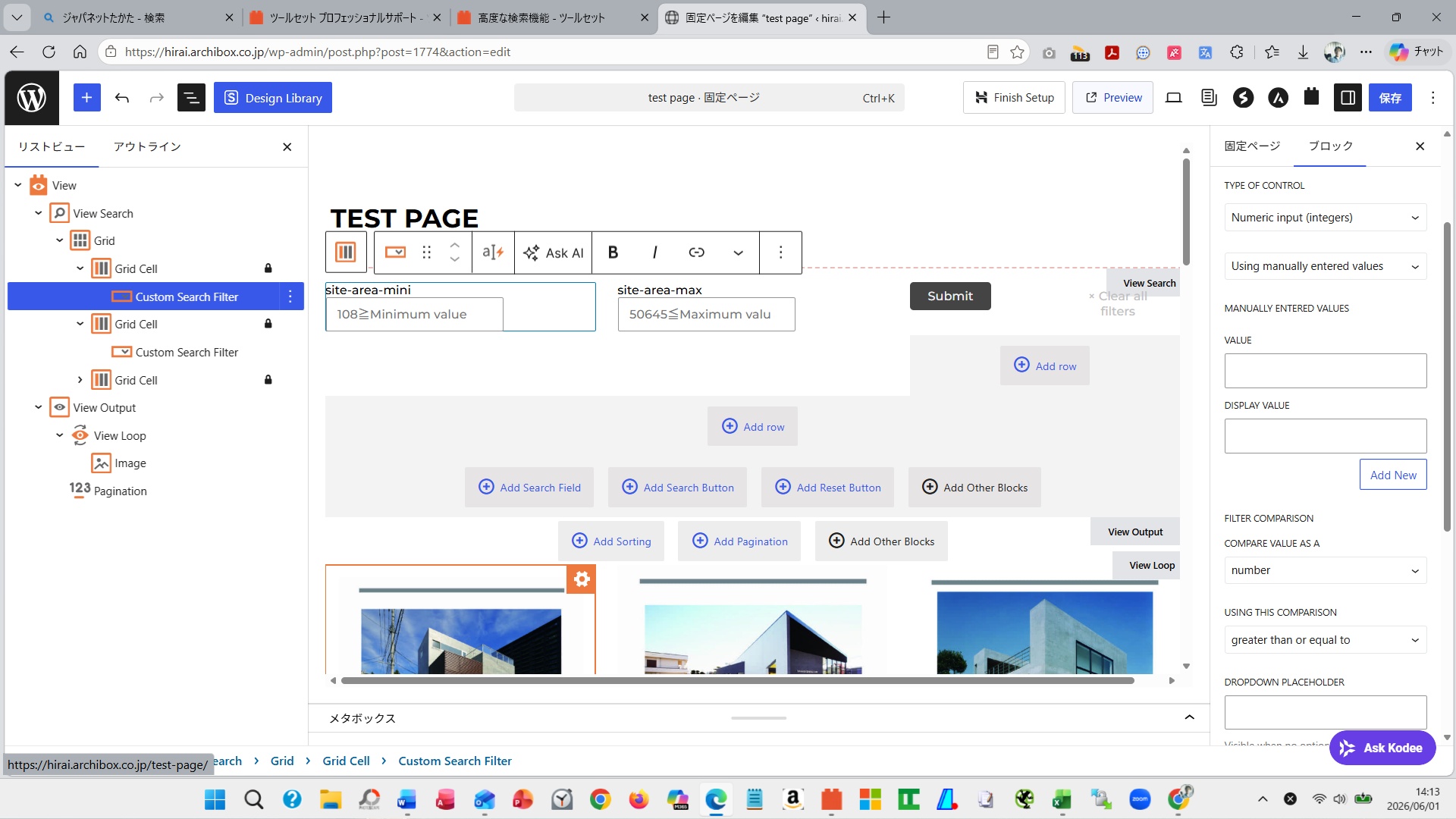
search-2026.6.1.jpg

Hello, toolset support team.

I would like to request support regarding the search function.
I am currently building a website for an architectural design firm.
I am trying to implement a search function for the buildings I have designed.
The custom fields for buildings include site area, building area, and total floor area.
I would like to allow searching by a single custom field, site area.
Therefore, I would like to implement a search function where the user can enter a minimum and maximum value for the site area, and then view buildings within that range.

The settings for implementing the search function are as follows:
1. I set a View on Testpage.
2. View > Content Selection > Query Filter

3. Query Filter>Condition
3-1) Condition: is greater than or equal to
3-2) Value: URL parameter
3-3) Parameter name: site-area-min
3-4) Condition: is less than or equal to
3-5) Value: URL parameter
3-6) Parameter name: site-area-max

4. Custom Search Filter>Field = site-area>Next
4-1) Type of control = numeric input, using manually entered value
4-2) Filter comparison>Compare value as a=number
4-3) Using this comparison=is greater than or equal to
4-4) URL parameter = site-area-min
4-5) Type of control = numeric input, using manually entered value
4-6) Filter comparison>Compare value as a=number
4-7) Using this comparison=is lower than or equal to
4-8) URL parameter = site-area-max

Testing the search function by entering minimum and maximum values ​​resulted in the search not working correctly.

I'm sending you a screenshot of my current settings; please help me with this.

#2863150

Minesh
Colaborador

Idiomas: Inglés (English )

Zona horaria: Asia/Kolkata (GMT+05:30)

Hello. Thank you for contacting the Toolset support.

Can you please share problem URL and admin access details.

*** Please make a FULL BACKUP of your database and website.***
I would also eventually need to request temporary access (WP-Admin and FTP) to your site. Preferably to a test site where the problem has been replicated if possible in order to be of better help and check if some configurations might need to be changed.

I have set the next reply to private which means only you and I have access to it.

#2863165

Minesh
Colaborador

Idiomas: Inglés (English )

Zona horaria: Asia/Kolkata (GMT+05:30)

Can you please check now:
- enlace oculto

With the filter control you added within your view's search area - I've changed the "Type of Control" for your search field to "Text box".
- enlace oculto

Can you please confirm it works as expected now.

#2863169

Thank you for your support, minesh-san.

I've checked it.
To clarify my understanding, the minimum value is set at 108 or higher, so I'll enter a suitable number greater than or equal to 108, for example, 500. I'll leave the maximum value field blank. The result should display buildings with values ​​of 500 or higher, starting from the leftmost entry. Buildings with values ​​less than or equal to 500 should be excluded from the search and therefore not displayed. If my understanding is correct, then the search results shouldn't be displayed that way. What are your thoughts, minesh?

Yoshihiko

#2863178

Minesh
Colaborador

Idiomas: Inglés (English )

Zona horaria: Asia/Kolkata (GMT+05:30)

I've enable the option "Show both the legacy and Blocks interface and let me choose which to use for each item I build":
- https://toolset.com/course-lesson/enabling-legacy-version-of-toolset-views/

With the search section you have on the following page:
=> enlace oculto

I've added the shortcode block for min and max section and for the min section I've added the following code:

<div class="form-group">
	<label for="wpv-wpcf-site-area_min">[wpml-string context="wpv-views"]site-area min[/wpml-string]</label>
	[wpv-control-postmeta type="textfield" field="wpcf-site-area" placeholder="enter place holder text" url_param="wpv-wpcf-site-area_min"]
</div>

And for the max section I've added the following code:

<div class="form-group">
	<label for="wpv-wpcf-site-area_max">[wpml-string context="wpv-views"]site-area max[/wpml-string]</label>
	[wpv-control-postmeta type="textfield" field="wpcf-site-area" placeholder="enter place holder text" url_param="wpv-wpcf-site-area_max"]
</div>

I've added the followinng code to "Custom Code" section offered by Toolset:
=> enlace oculto

add_filter( 'wpv_filter_query', 'custom_site_area_filter', 10, 3 );

function custom_site_area_filter( $query_args, $view_settings, $view_id ) {

    if ( (int) $view_id !== 1822 ) {
        return $query_args;
    }

    $min = isset( $_GET['wpv-wpcf-site-area_min'] )
        ? trim( $_GET['wpv-wpcf-site-area_min'] )
        : '';

    $max = isset( $_GET['wpv-wpcf-site-area_max'] )
        ? trim( $_GET['wpv-wpcf-site-area_max'] )
        : '';

    if ( $min === '' && $max === '' ) {
        return $query_args;
    }

    // Remove existing Toolset filter for this field
    if ( ! empty( $query_args['meta_query'] ) ) {

        foreach ( $query_args['meta_query'] as $key => $clause ) {

            if (
                is_array( $clause )
                && isset( $clause['key'] )
                && $clause['key'] === 'wpcf-site-area'
            ) {
                unset( $query_args['meta_query'][ $key ] );
            }
        }

        $query_args['meta_query'] = array_values( $query_args['meta_query'] );
    }

    // Build our custom clause
    if ( $min !== '' && $max === '' ) {

        $query_args['meta_query'][] = [
            'key'     => 'wpcf-site-area',
            'value'   => (float) $min,
            'compare' => '>=',
            'type'    => 'NUMERIC',
        ];

    } elseif ( $min === '' && $max !== '' ) {

        $query_args['meta_query'][] = [
            'key'     => 'wpcf-site-area',
            'value'   => (float) $max,
            'compare' => '<=',
            'type'    => 'NUMERIC',
        ];

    } else {

        $query_args['meta_query'][] = [
            'key'     => 'wpcf-site-area',
            'value'   => [ (float) $min, (float) $max ],
            'compare' => 'BETWEEN',
            'type'    => 'NUMERIC',
        ];
    }

    return $query_args;
}

Can you please confirm it works as expected.

More info:
- https://toolset.com/documentation/programmer-reference/adding-custom-code/using-toolset-to-add-custom-code/
- https://toolset.com/documentation/programmer-reference/views-filters/#wpv_filter_query

#2863184

Good evening, mnesh-san.

Thank you very much for your support.
I've tested the corrected content. I believe the minimum and maximum functions work perfectly.

By the way, I have a question for you.

It's about how to handle and think about maximum and minimum values ​​numerically.

Is it impossible to create a system that searches for a desired item by setting maximum and minimum values ​​using only the Toolset function? Is writing code essential? Is there a way to achieve this without coding?

Or, reconsidering my approach, is it possible to create a search function using only the maximum or minimum value without coding, using only the Toolset?

I want to add a search function that allows searching not only by site area, but also by building area and total floor area. Furthermore, I believe I need to be able to freely create similar numerical (maximum and minimum) search functions for other general websites.

My ultimate goal is to create a search function that is simpler and faster. I would be very grateful if you could tell me if there is a good solution.

Best Regards,
Yoshihiko

#2863185

Minesh
Colaborador

Idiomas: Inglés (English )

Zona horaria: Asia/Kolkata (GMT+05:30)

Is it impossible to create a system that searches for a desired item by setting maximum and minimum values ​​using only the Toolset function? Is writing code essential? Is there a way to achieve this without coding?
==>
WE have "between" clause and range filter usinng "between" clause but in that cause you have to enter both nin and max values. For such custom reuirement we have to add such code.

There is no automatic way - but you will have to enter such customiztion code as required and it depends on your requirement.

As I aleady addressed the original question I require you to mark resolve this ticket and feel free to open a new ticket with every new question you may have.