Saltar navegación

[Resuelto] Compatibility issue with WP 7.1.2

This is the technical support forum for Toolset - a suite of plugins for developing WordPress sites without writing PHP.

Everyone can read this forum, but only Toolset clients can post in it. Toolset support works 6 days per week, 19 hours per day.

Sun Mon Tue Wed Thu Fri Sat
- 10:00 – 13:00 10:00 – 13:00 10:00 – 13:00 10:00 – 13:00 10:00 – 13:00 -
- 14:00 – 18:00 14:00 – 18:00 14:00 – 18:00 14:00 – 18:00 14:00 – 18:00 -

Zona horaria del colaborador: Asia/Kolkata (GMT+05:30)

Este tema contiene 10 replies, tiene 1 mensaje.

Última actualización por - 2 weeks, 3 days ago.

Asistido por: Minesh.

Author
Mensajes
#2884059
Screenshot 2026-09-29 141054.png
Screenshot 2026-09-29 110503.png

Hello,
After updating to WordPress 7.1.2, I encountered a severe UI bug in the Block Editor caused by how Toolset handles script and stylesheet enqueueing. This was an old bug fixed already and now coming back.

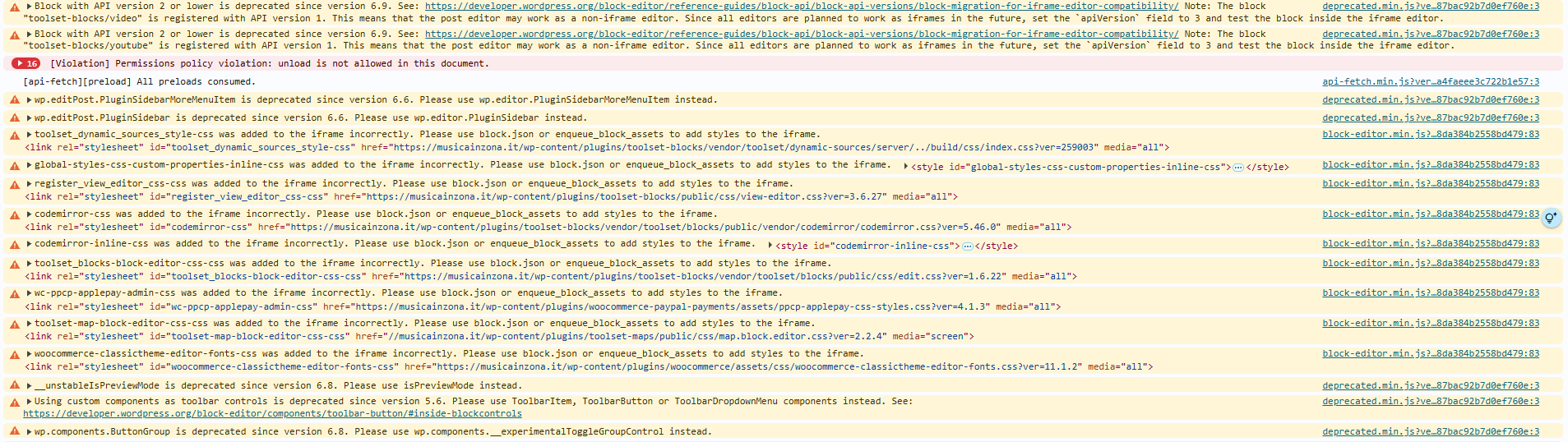
In WP 7.1.2, the Block Editor enforces strict iframe isolation. Because Toolset registers and enqueues several global assets (such as codemirror-css, toolset_blocks-block-editor-css-css, and register_view_editor_css-css) using legacy API methods (v1/v2), WordPress logs multiple console errors/warnings:
...was added to the iframe incorrectly. Please use block.json or enqueue_block_assets to add styles to the iframe.

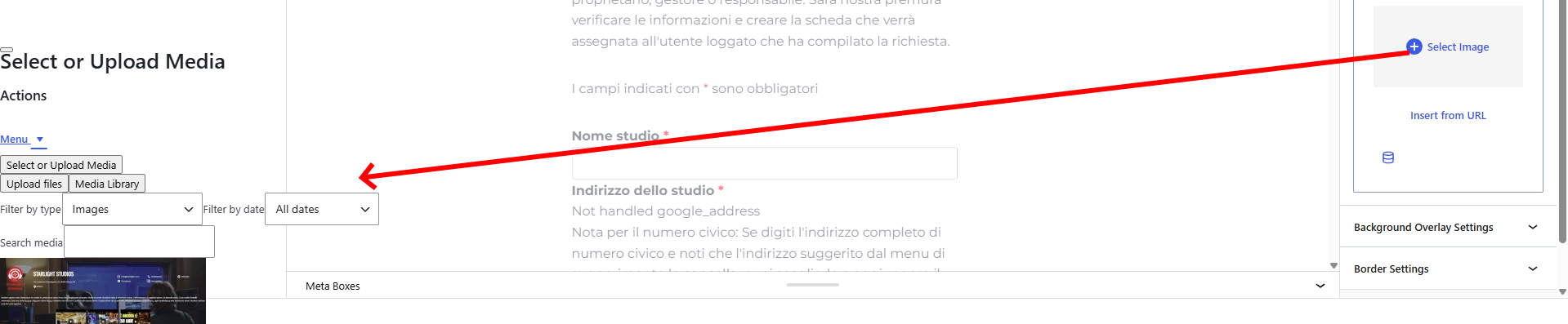
This asset injection conflict breaks the DOM rendering context of the Gutenberg editor. Consequently, whenever I click to open the native WordPress Media Library (wp.media) from block Inspector Controls (e.g. setting a background image in a Container, Grid, or third-party block), the .media-modal element fails to render as a full-screen overlay. Instead, it gets injected crushed directly inside the right-hand Inspector Sidebar, rendering the editor unusable.

You can reproduce this:

- Update site to WordPress 7.1.2 with Toolset active.
- Open any page/post containing Toolset blocks or CRED forms in the Block Editor.
- Select a container and try to select/upload a background image.
- the Media Modal will break and rendered squeezed inside the sidebar (see screenshot)

It looks like an incompatibility between Toolset and WordPress 7.1.2 iframe standards and Block API v3.
Please check, thanks
Regards
Nicola

#2884404

Minesh
Colaborador

Idiomas: Inglés (English )

Zona horaria: Asia/Kolkata (GMT+05:30)

Hello. Thank you for contacting the Toolset support.

Based on the debug information you shared with us, I found that you are using the old Toolset plugin version.

I'm not sure if you are aware about the last release we publish:
- https://toolset.com/2026/09/toolset-is-back-on-a-monthly-beat-wpml-5-0-wordpress-7-1-font-awesome-6-and-more/

*** Please make a FULL BACKUP of your database and website.***

Can you please update ALL Toolset plugins to latest version.

How to update:
- In your WordPress admin, go to Plugins and open the Commercial tab.
- Click Check for updates and update all Toolset plugins.

Alternatively, log into your Toolset Account page, click Downloads in the left sidebar and then click Download Toolset manually. Finally, download the plugins you need, and manually upload them to your site.

Do you see the same issue afrer yuo update ALL Toolset plugins to the latest version?

#2884577
Screenshot 2026-09-30 185017.png

Hello Minesh,
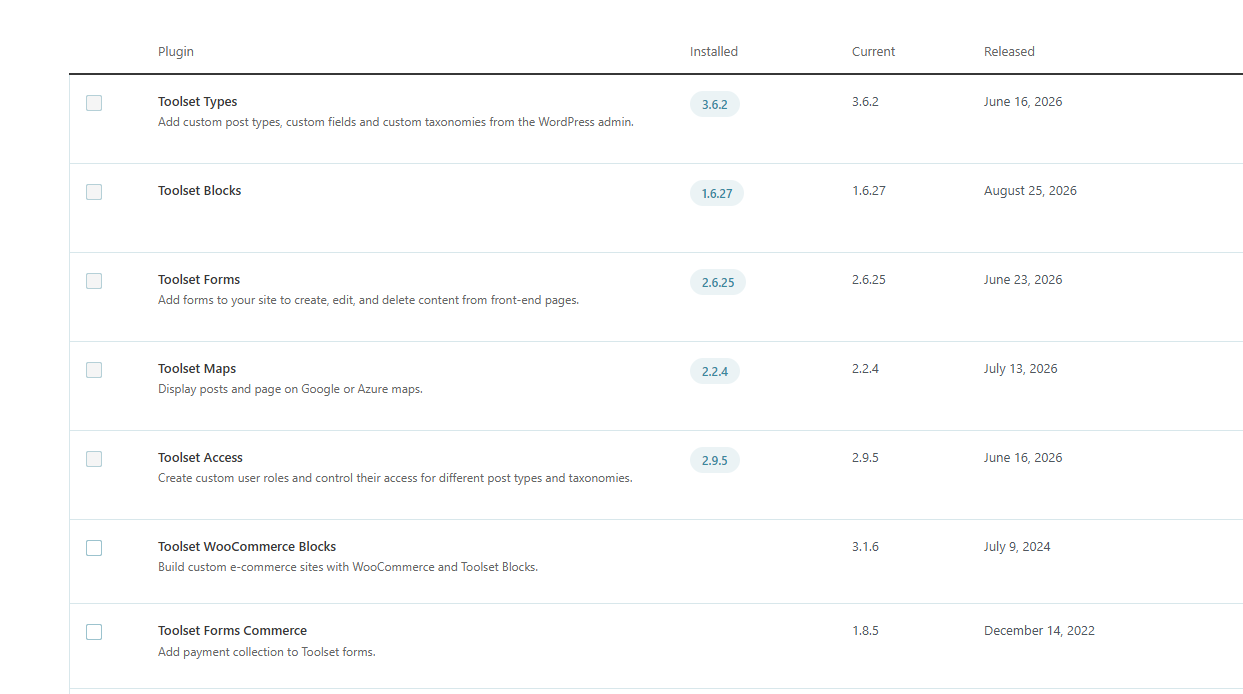
it looks I am on the latest versions for all plugins, please see screenshot. Are there more recent versions ?
Thanks

#2884906

Minesh
Colaborador

I would like to inform you that we just release a new hotfix version today for Toolset blocks/view and maps:
- Toolset Blocks v(1.6.29) / Toolset Views v(3.6.29)
- Toolset Maps v(2.4.0)

Note:
At a time either you will require Toolset Blocks or Toolset Views plugin. You can not activate both
plugins as both are 1:1 copy.

Can you please update ALL Toolset plugins to latest version and I hope that help you to fix the issue you reported with this ticket.

Do you see it working with latest release?

#2885456

Hello Minesh,
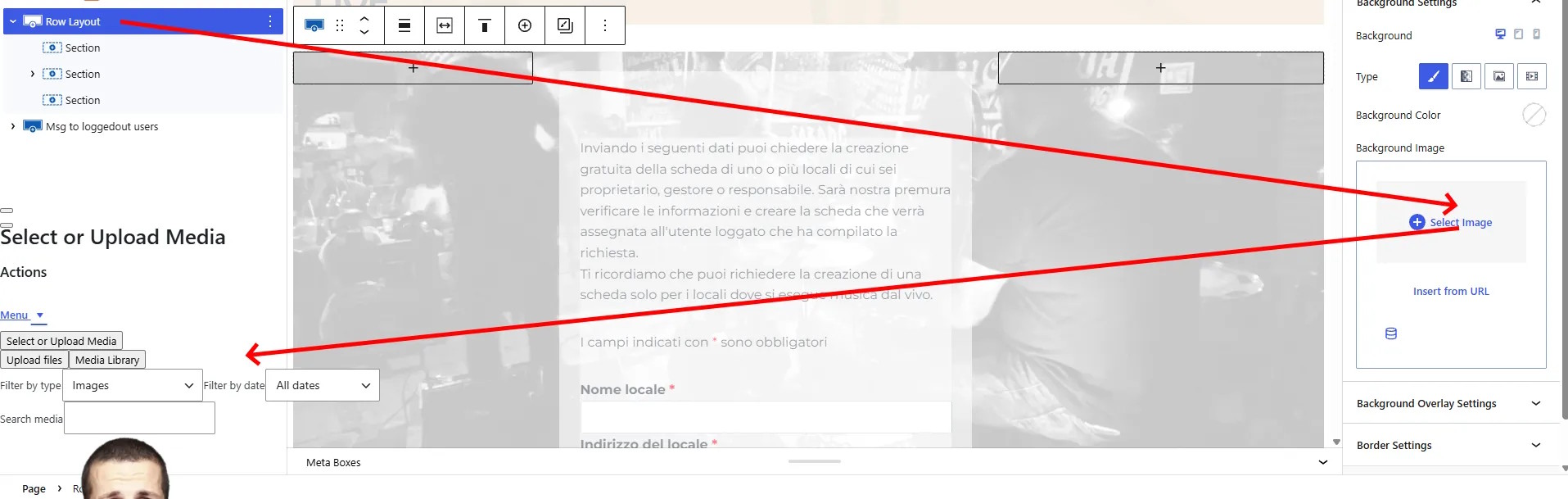
thanks for your quick reply. I have updated the plugins, but the issue persists. Good news is that after further investigations I have found the guilty. When a Toolset form containing a file/image upload field (such as [cred_field field='logo-load'...]) is rendered inside a page it corrupts the global positioning of the WordPress wp.media library modal. Trying to open the media library (for example, to set a background image in a Kadence row layout), the modal window is forced entirely out of place (appearing squished and shifted to the far left of the screen). See screenshot. It doesn't matter where the form is placed on the page (in or out, before or after containers). Removing the form from the page, or simply removing the file/logo upload field from the form code, the WordPress media modal instantly goes back to normal and centers properly. Please try to replicate it yourself and let me know.
Kind regards
Nicola

#2885663
screenshot.jpg

missing screenshot, sorry

#2885668
newmap.jpg

Hi Minesh,
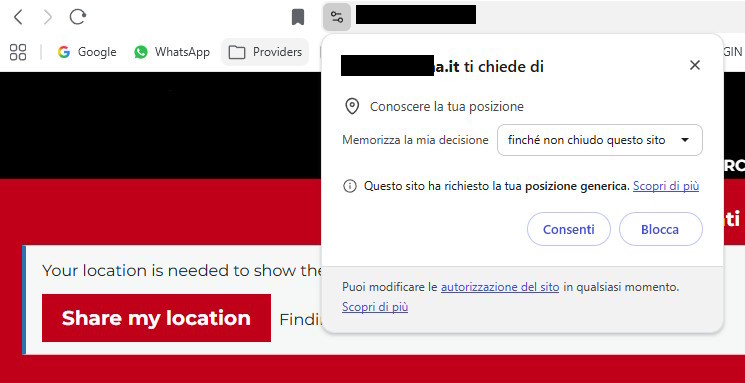
After the recent plugin update to version 2.4.0 I am experiencing a new issue with Toolset Maps regarding the visitor geolocation and consent workflow.
Previously, I used a view called position-tracking-test to check if a user had granted location consent, and the native browser permission prompt would trigger smoothly. However, after updating Toolset Maps, the behavior has completely broken or changed in an unexpected way:
- If I disable "Offer visitors the location features" in Toolset Maps settings, the browser geolocation permission prompt completely fails to trigger, and nothing happens.
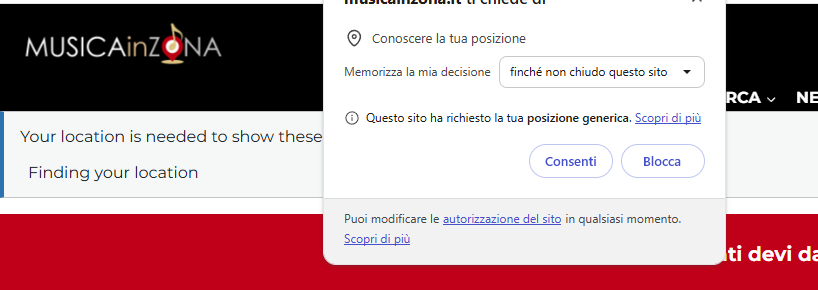
- If I enable "Offer visitors the location features", a never seen before consent box ("Share my location" red block) appears simultaneously with the native browser permission prompt. This results in a confusing double-consent user experience.

I am open to adopt a different, new and more accurate method to test the user consent from Toolset, but only one consent box should appear, not two.
Could you please clarify what changed in the latest update regarding how Visitor Location and conditional shortcodes handle permissions, and how we can achieve a clean, single-prompt workflow with the current version?
Thanks
Nicola

position-tracking-test view code
----------------------------------
[wpv-geolocation message_when_missing="N"]
[wpv-conditional if="( '[toolset-maps-distance-value origin_source='visitor_location' postmeta='wpcf-user-address']' ne '' )"]
Y
[/wpv-conditional]
[wpv-conditional if="( '[toolset-maps-distance-value origin_source='visitor_location' postmeta='wpcf-user-address']' eq '' )"]
N
[/wpv-conditional]
[/wpv-geolocation]

Conditionals
--------------------------
The result of [trim_view name='position-tracking-test'] is not equal to Y
The result of [trim_view name='position-tracking-test'] is equal to Y ------> show maps and distances

#2885809

Minesh
Colaborador

Can you please clarify what browser and operating system you are using?

Also share problem URL and admin access details where I can see the issue.

*** Please make a FULL BACKUP of your database and website.***
I would also eventually need to request temporary access (WP-Admin and FTP) to your site. Preferably to a test site where the problem has been replicated if possible in order to be of better help and check if some configurations might need to be changed.

I have set the next reply to private which means only you and I have access to it.

#2885834

Minesh
Colaborador

Hello Nicola,

Thank you for sharing the View code. We set up your position-tracking-test View on a test site with Toolset Maps 2.4.0 and saw the same behavior. Both things you describe are expected in 2.4.0, and your View itself still works: it returns N until the visitor allows the location, and Y after that.

What changed in Toolset Maps 2.4.0:

"Offer visitors the location features" (Toolset > Settings > Maps > Visitor location) is a new site-wide switch, on by default. When it's off, the site never asks visitors for their location, so the browser prompt never appears and your View always returns N. You should always keep it on.

When it's on and the visitor hasn't shared a location yet, [wpv-geolocation] shows its message together with a "Share my location" button. The browser asks for the location at the same moment, as before.
The button isn't a second consent. It sends the same browser request again, for visitors who closed the prompt without answering. The browser prompt is the only permission the visitor gives.
After the visitor allows, the location is kept in a session cookie until the browser closes, and the page reloads once to show the content.

To show only the browser prompt, add this CSS, for example in Appearance > Customize > Additional CSS:

.toolset-maps-location-request { display: none; }

We tested it: the button disappears, the browser prompt still appears on page load, and your View still switches from N to Y after the visitor allows. Without the button, if a visitor closes the prompt, the page asks again the next time it loads.

One more detail: the box in your screenshot shows the default text "Your location is needed to show...", not your "N". So it comes from another element on that page that needs the visitor's location, for example a View filtered or sorted by distance from the visitor. The CSS above removes the button there too.

Can you try it and let me know how it goes?

#2885852
Screenshot 2026-10-05 144245.png

Hi Minesh,
I did some tests (Visitor location checkbox =on):

- as it was before (with only conditionals and no CSS): nothing happens, no Toolset message and no (browser's) consent box -> before the first conditional testing the result of my view was enough to trigger the consent box, now it doesn't happen anymore so I decided to add the view shortcode to trigger the consent box, expecting to see both toolset message and consent box
- I added the shortcode INSIDE the conditional and I got your message + consent box ontop
- I moved the shortcode OUTSIDE the conditional, same result
- I added your css for hiding your message box in an additional html block after the shortcode and I still got the double messaging while your one has no button and looks waiting for the user input on the consent box. I closed the box without chosing anything and reloaded the page and the consent box appeared again with your message underneath.
- I tried to move the css in the view, but it doesn't work either.
Sorry but I don't understand the need to provide a message to those who closed the consent box instead of chosing. They actually did't give their consent so their choiche would be the same as "no consent".
thanks

#2886012

Update: reading the code I've seen that the correct name of the class is .toolset-maps-location-REQUIRED not .toolset-maps-location-request. Now it works as before. Thanks. Regards Nicola