Saltar navegación

[Resuelto] View filter by distance

This support ticket is created 3 years, 9 months ago. There's a good chance that you are reading advice that it now obsolete.

This is the technical support forum for Toolset - a suite of plugins for developing WordPress sites without writing PHP.

Everyone can read this forum, but only Toolset clients can post in it. Toolset support works 6 days per week, 19 hours per day.

Sun Mon Tue Wed Thu Fri Sat
- 10:00 – 13:00 10:00 – 13:00 10:00 – 13:00 10:00 – 13:00 10:00 – 13:00 -
- 14:00 – 18:00 14:00 – 18:00 14:00 – 18:00 14:00 – 18:00 14:00 – 18:00 -

Zona horaria del colaborador: Asia/Kolkata (GMT+05:30)

Este tema contiene 6 respuestas, tiene 2 mensajes.

Última actualización por jamesR-20 3 years, 9 months ago.

Asistido por: Minesh.

Autor
Mensajes
#2443863
Screenshot 2022-08-24 132054.png

I am trying to filter a view based on distance from the parent post.

eg1. enlace oculto
eg2. enlace oculto

The parent post is CPT 'Location' and the list items are CPT 'Listing'

Each Listing and Location has a custom field for Address which stores the address in the format {lat,long}

As you can see below each Listing I can display the locations in the text using shortcode:
Parent: [types field="post-lat-long" item="$current_page" format="FIELD_LATITUDE,FIELD_LONGITUDE"][/types]
Self: [types field="post-lat-long"][/types]
Distance: [toolset-maps-distance-value location='[types field="post-lat-long" item="$current_page" format="FIELD_LATITUDE,FIELD_LONGITUDE"][/types]' postmeta='wpcf-post-lat-long']

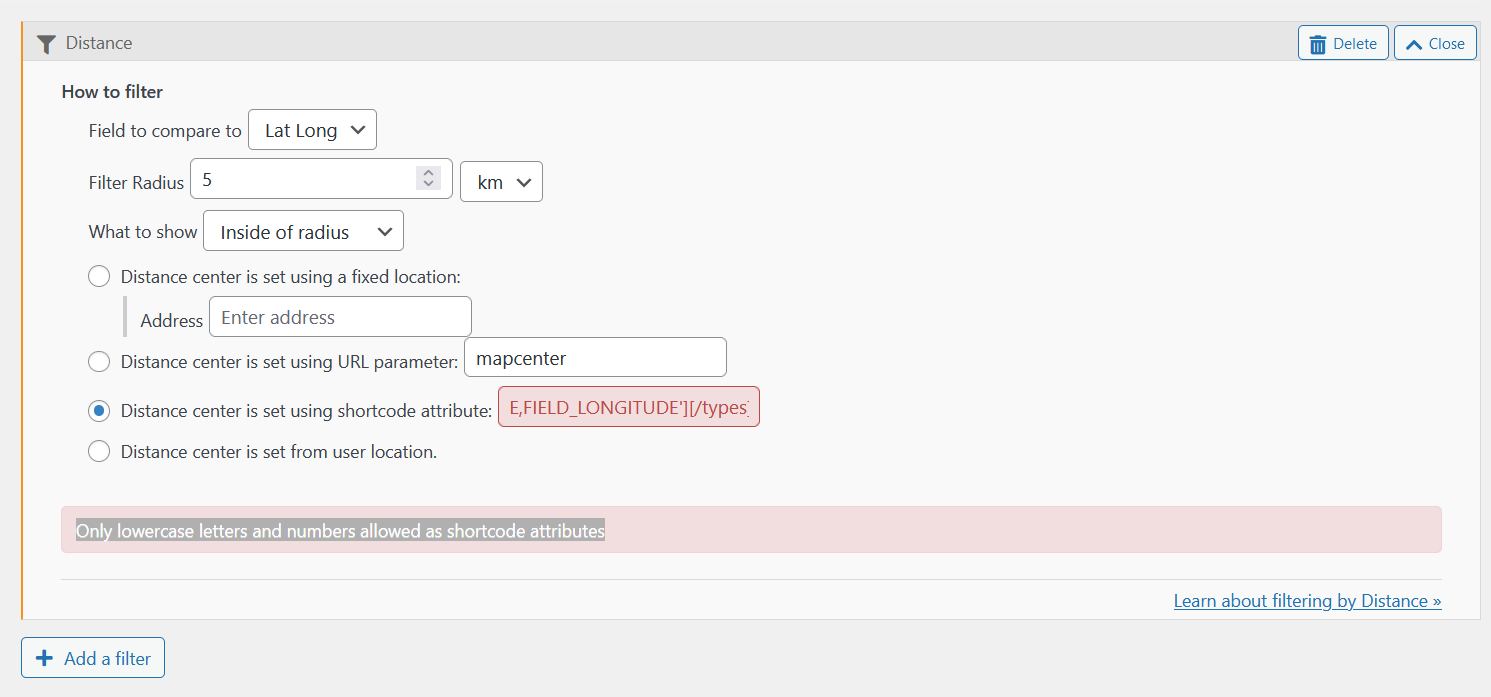
Unfortunately I cannot find a shortcode that will work in the Query Filter for Distance in the classic view editor.

I was unable to create or save a Distance filter in the block editor view so I had to revert to classic.

I also get the error 'Only lowercase letters and numbers allowed as shortcode attributes' when trying to change the shortcode for the distance filter in classic view (see screenshot).

#2443913

Minesh
Colaborador

Idiomas: Inglés (English )

Zona horaria: Asia/Kolkata (GMT+05:30)

Hello. Thank you for contacting the Toolset support.

Can you please tell me what view you created and where you added that view and share admin access details.

Please share problem URL and tell me what results you want to filter.

*** Please make a FULL BACKUP of your database and website.***
I would also eventually need to request temporary access (WP-Admin and FTP) to your site. Preferably to a test site where the problem has been replicated if possible in order to be of better help and check if some configurations might need to be changed.

I have set the next reply to private which means only you and I have access to it.

#2443923

Minesh
Colaborador

Idiomas: Inglés (English )

Zona horaria: Asia/Kolkata (GMT+05:30)

I've added the view you created using the "Fields and Text" block as given under to the content template:
=> enlace oculto

[wpv-view name="listings-near-this-location" location="[types field='post-lat-long' item='$current_page' format='FIELD_LATITUDE,FIELD_LONGITUDE'][/types]"]

I've also changed the "Query Filter" for your view as given under:
=> enlace oculto

Show posts within 5km radius of address/coordinates provided using location shortcode attribute.

Screenshot: enlace oculto

Can you please confirm it works as expected?

#2443927

That does seem to work! Thanks for your help. It obviously didn't like me putting the shortcode directly into the query filter.

#2443979

How can I add a sort by distance to the view shortcode?

Los hilos nuevos creados por Minesh y vinculados a este se encuentran a continuación:

https://toolset.com/es/forums/topic/split-view-filter-by-distance-how-to-sort-by-distance/

#2443983

Minesh
Colaborador

Idiomas: Inglés (English )

Zona horaria: Asia/Kolkata (GMT+05:30)

As per our support policy we entertain only one question pet ticket. As your original issue was resolved, I've split the ticket with your new question. We will communicate with new ticket. You are welcome to mark resolve this ticket with some different text like "This is resolved now".

#2443995

My issue is resolved now. Thank you!








