Saltar navegación

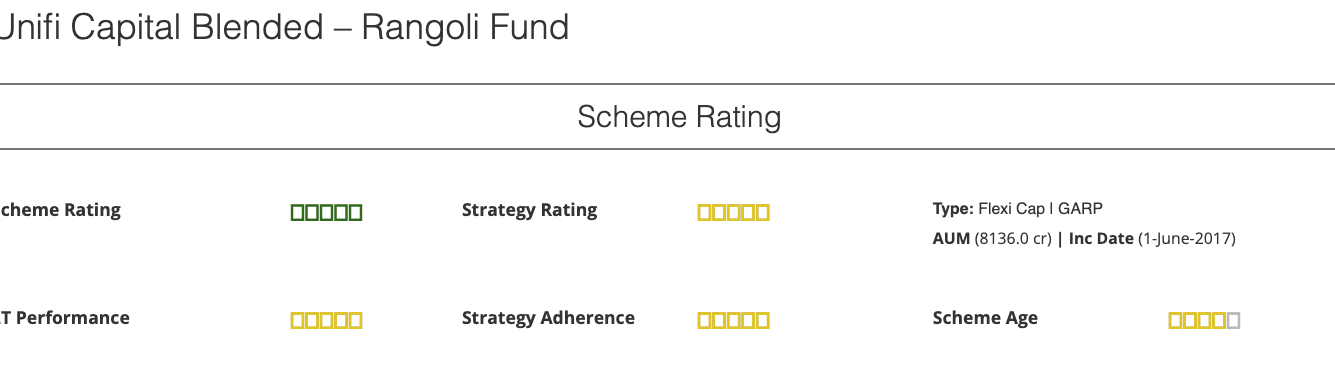
[Resuelto] Star rating widget is showing up as boxes instead of stars on the front-end

This support ticket is created 2 years, 11 months ago. There's a good chance that you are reading advice that it now obsolete.

This is the technical support forum for Toolset - a suite of plugins for developing WordPress sites without writing PHP.

Everyone can read this forum, but only Toolset clients can post in it. Toolset support works 6 days per week, 19 hours per day.

Sun Mon Tue Wed Thu Fri Sat
- 10:00 – 13:00 10:00 – 13:00 10:00 – 13:00 10:00 – 13:00 10:00 – 13:00 -
- 14:00 – 18:00 14:00 – 18:00 14:00 – 18:00 14:00 – 18:00 14:00 – 18:00 -

Zona horaria del colaborador: Asia/Kolkata (GMT+05:30)

Este tema contiene 2 respuestas, tiene 2 mensajes.

Última actualización por ashiA 2 years, 11 months ago.

Asistido por: Minesh.

Autor
Mensajes
#2621551
Screenshot 2023-07-06 at 10.34.16 AM.png

Hi, I have been using the star rating widget to display 5-star ratings for products on our site (the star ratings are displayed via a Toolset template for specific content types). However, after the latest update, these ratings are showing up as boxes instead of stars - sharing a couple of links where this is happening

enlace oculto
enlace oculto

#2621565

Minesh
Colaborador

Idiomas: Inglés (English )

Zona horaria: Asia/Kolkata (GMT+05:30)

Hello. Thank you for contacting the Toolset support.

It seems a CSS conflict.

What if you try to add the following CSS code to your content template's CSS box:

.tb-rating span {
    font-family: dashicons, sans-serif !important;
}

More info:
- https://toolset.com/course-lesson/adding-custom-css-to-templates-archives-and-views/#steps-for-adding-css-to-a-content-template

#2621885

My issue is resolved with this CSS change. Thank you!