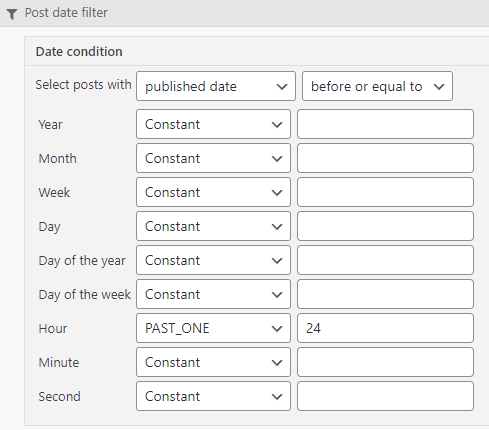
I'm having a hard time understanding your date/time filters. I would like to show posts that are at least 24 hours old. Attached is a screenshot of the settings I put in but it's not working. I have tried other combinations and nothing seems to work. I have read through your documentation on this and still can't figure it out. Sorry for the dumb question.
- Aaron
Hi Aaron,
Based on your filter it would appear that you're checking for posts that were created before 24 hours ago.
Can you try changing it to "After or Equal to" and setting the Day to 1 instead of using hour. If that doesn't work then we can use the filter below.
function tssupp_date_filter( $query_args, $view_settings, $view_id ){

    if ( 123 == $view_id ) { // Edit View ID
        $query_args['date_query'] = array(
            array(
                'column'    =>   'post_date_gmt',
                'after'     =>   '1 day ago'
            )
        );
    }

    return $query_args;
}
add_filter( 'wpv_filter_query', 'tssupp_date_filter', 101, 3 );
Thanks,
Shane
Hi Shane,
No, I want to only show posts that are older than 24 hours ("at least 24 hours old"). If they have been created within the past 24 hours, they should NOT be displayed. Did I enter this correctly into my view and, if so, why isn't it working? Thanks.
- Aaron
Hi Aaron,
I know that we are having various challenges when it comes to the date filters. Most times it's a hit and miss.
However it can be remedied with the use of our Hooks. In your case you can simply use the Day parameter instead of the Hour. Change it to Before or Equal to 1 day.
In terms of the Hook it would be.
function tssupp_date_filter( $query_args, $view_settings, $view_id ){

    if ( 123 == $view_id ) { // Edit View ID
        $query_args['date_query'] = array(
            array(
                'column'    =>   'post_date_gmt',
                'before'     =>   '1 day ago'
            )
        );
    }

    return $query_args;
}
add_filter( 'wpv_filter_query', 'tssupp_date_filter', 101, 3 );
Please remember to change the 123 to the ID of your view.
Thanks,
Shane
Setting the view to 1 day in the past does not work either, so unfortunately I'm going to have to use the custom code. Would it be possible to let me know if this bug gets fixed in the future so I can remove the custom code later? Thanks.
- Aaron
Hi Aaron,
Yes we can notify you once this gets fixed.
Also the custom filter works fine for your case correct?
Thanks,
Shane