Hi, luckily at the moment, I still have my WP staging for reference. However, the bigger issue at the moment, is that this issue is affecting my live site.
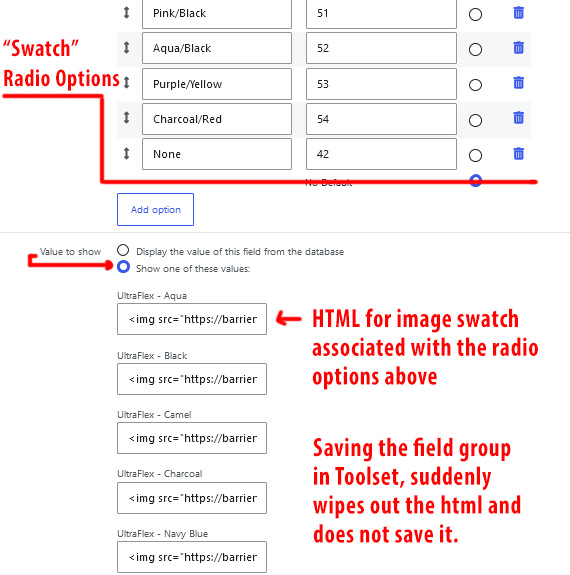
I have not needed to edit my post field group in a long time, as there has been no need to. Upon adding a new (simple) text field today to my post field group and 'saving', I noticed that my swatch images were no longer displaying on the front end of my website. It's only showing the associated value and not the html (image tag) that it normally would.
When I saved the field group, suddenly the html associated with what should be shown when a specific radio option is selected, gets cleared out. The html no longer saves in that area.
I tried right away to add the html back into the input field and save the field group once again, but this no longer saves the html. Is there a wya to fix this? Or is there a better way to do this by using the other option to "Display the value of this field from the database".
Either way, I really need some urgent help please. The issue was unexpected and left stuck here until I can find a way to fix it. Please advise.
Thanks,
Will
Apparently this was caused by the permanent security fix introduced in Toolset Types (v3.3.4 and later).
I was able to resolve this issue with the following solution:
When you choose "Show one of these values," Toolset allows you to define a custom text label for each radio button option. Historically, you could freely add ![]() tags or HTML elements here. However, Toolset now blocks this globally to prevent code injection. Because you hadn't edited that specific post field group in a long time, the old HTML was preserved in your database—but the moment you clicked Save today, the new security filter kicked in and immediately stripped the tags.
tags or HTML elements here. However, Toolset now blocks this globally to prevent code injection. Because you hadn't edited that specific post field group in a long time, the old HTML was preserved in your database—but the moment you clicked Save today, the new security filter kicked in and immediately stripped the tags.
Step 1: Add the Toolset Label Bypass Filter
You must register the filter hook that explicitly tells Toolset to stop stripping HTML from field option labels.
Go to your WordPress Dashboard and navigate to Toolset > Custom Code (or use a plugin like Code Snippets).
Create a new code snippet and paste the following snippet:
/**
* Deactivate the sanitization of Toolset custom field and option labels
* so that they can contain HTML code.
*/
add_filter( 'types_sanitize_field_labels', '__return_false' );
Once the snippet is active, Toolset will no longer strip the tags when updating field groups.
This resolved my issue.