Hi,
I am encountering a possible bug with CRED forms when using a repetitive image field in post Edit mode.
Here is what happens:
When a post is initially created (Add form), the images upload correctly in sequence ans and images appear as expected in the frontend.
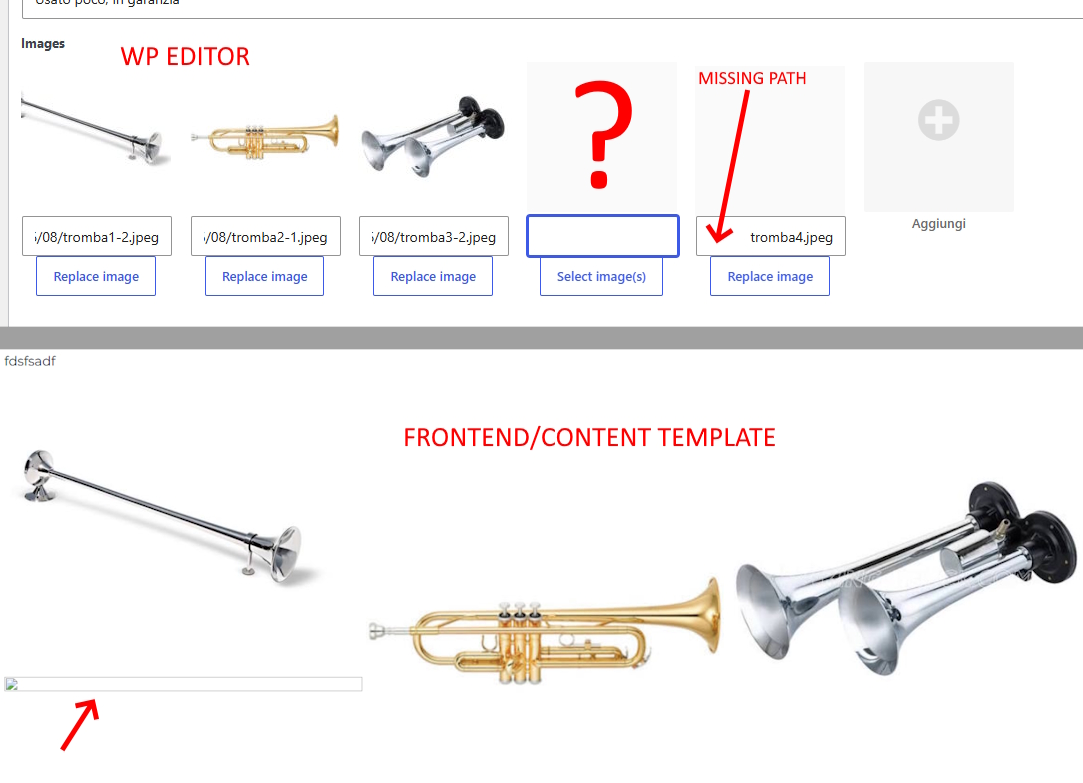
However, when reopening the post in Edit mode and trying to append/add a new image to the existing repetitive set, Toolset creates a "hole" or an empty slot (see question mark in the screenshot) and another slot with missing path for the newly added image (the file path gets broken or corrupted, as shown in the screenshot).
On the frontend/Content Template, of course, this results in a broken image icon because of the invalid or empty file path.
Could you please check this behavior or provide a fix/workaround?
Thank you! Regards
Nicola
Additional info: what happens in the database
Hi Nicola,
Welcome to Toolset Support. Could you please test whether the problem occurs with a minimal setup?
- IMPORTANT: Create a backup of your website. An even better approach would be to perform this test on a copy or staging version of the website to avoid disrupting the live site.
- Switch to a default theme, such as Twenty Twenty, by going to "WordPress Dashboard > Appearance > Themes."
- Go to "WordPress Dashboard > Plugins" and deactivate all plugins except:
- Toolset Types
- Toolset Blocks
- Also, remove any custom code you may have under "Toolset > Settings > Custom Code."
- Check whether you can still reproduce the issue.
- If not, reactivate the plugins one at a time and check for the issue after activating each one to identify the plugin causing the problem.
Thanks.
Hello Christopher,
I have an old version of my site on another domain that I use as staging, you can do whatever you want there, I have backups too. I was able to reproduce the issue here as well in a normal set. Now I have deactivated almost all plugins (but key ones) and changed the theme to 2025. The site looks very messed up of course but I was able to enter a new post with a few images in order to edit it adding another image. But now the content template of the edit page doesn't work anymore, I don't know why, although the edit form opens fine in the editor. If you can make it work you can test the issue yourself. I could restore the site in seconds anytime. Please open the private window and I will let you have all links, thanks regards
Nicola
Hi Nicola,
It will be hard for us to do investigation for something else which is not related to the images (about the template that you mentioned)
Can you copy the live website to a staging version so it will be possible to test without the issues you mentioned?
You can set the next reply as private to provide the login information and steps to reproduce the issue.
Thanks.
Hello Christopher, I have duplicated the site and followed your indications, I am further investigating, I'll let you know asap, thanks
Hello Christopher,
following your indications I have found what is creating the issue. The guilty is a snippet that Minesh sent me long time ago, pls read this:
https://toolset.com/forums/topic/split-cant-fill-featured-image-with-custom-field-first-image-repeating-field-sort-order-does-not-get-saved-correctly/
This snippet fixes the sorting bug, but creates another bug, that is what I have described above. If I deactivate the snippet the editing works fine while the sorting doesn't. Please send me a new snippet. If you need to test it please open a new private window and I will send you accesses to my staging area.
Thanks, regards
Nicola
Hi Nicola,
Would you please test this edited code?
add_action('cred_save_data', 'ts_save_the_rf_sort_order_manually', 10, 2);
function ts_save_the_rf_sort_order_manually($post_id, $form_data) {
	if ($form_data['id'] == 99999) {   // your form ID

		$field_slug = 'images';
		$upload_dir = wp_upload_dir();

		$field_content = isset($_POST['wpcf-'.$field_slug]) ? (array) $_POST['wpcf-'.$field_slug] : array();

		// keep only values that already contain the full upload URL
		$field_content_trimmed = array();
		foreach ($field_content as $v):
			if (!empty($v) && strpos($v, $upload_dir['baseurl']) !== false) {
				$field_content_trimmed[] = $v;
			}
		endforeach;

		// read the newly uploaded images back from the database
		$field_content_new = get_post_meta($post_id, 'wpcf-'.$field_slug, false);

		$merged_arr = array_unique(array_merge($field_content_trimmed, $field_content_new));
		$merged_arr = array_filter($merged_arr);

		$sort_order = array();
		delete_post_meta($post_id, 'wpcf-'.$field_slug);
		foreach ($merged_arr as $v):
			$sort_order[] = add_post_meta($post_id, 'wpcf-'.$field_slug, $v);
		endforeach;
		update_post_meta($post_id, '_wpcf-'.$field_slug.'-sort-order', $sort_order);

		// featured image from the first stored image
		$all_images = get_post_meta($post_id, 'wpcf-'.$field_slug, false);
		if (!empty($all_images[0])) {
			$attachment_id = attachment_url_to_postid($all_images[0]);
			if ($attachment_id) {
				update_post_meta($post_id, '_thumbnail_id', $attachment_id);
			}
		}
	}
}
Thanks.
Hi Christian,
it works fine now, thank you !
Best regards
Nicola