Saltar navegación

[Resuelto] remove shortcode in relevanssi excerpts

This support ticket is created 4 years, 8 months ago. There's a good chance that you are reading advice that it now obsolete.

This is the technical support forum for Toolset - a suite of plugins for developing WordPress sites without writing PHP.

Everyone can read this forum, but only Toolset clients can post in it. Toolset support works 6 days per week, 19 hours per day.

Este tema contiene 2 respuestas, tiene 2 mensajes.

Última actualización por Maurizio Federici 4 years, 8 months ago.

Autor
Mensajes
#2199845
stamp.gif

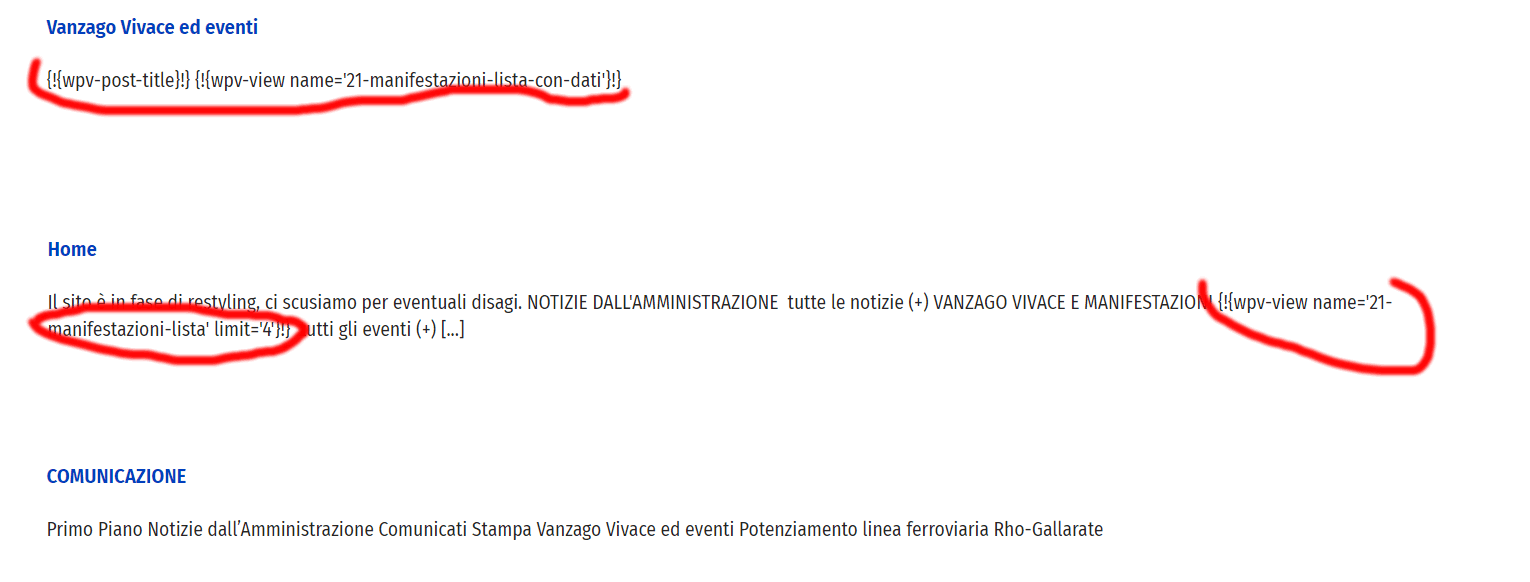
Is there a way to hide the shortcodes (see stamp) from the excerpts generated by relevanssi in the search results?
Thanks

#2200371

Nigel
Colaborador

Idiomas: Inglés (English ) Español (Español )

Zona horaria: Europe/London (GMT+01:00)

I take it you are using a page builder such as Divi, editing pages with the page builder, and inserting dynamic content into the page content via shortcodes.

Except, because of certain compatibility issues Toolset introduced a custom form of shortcode, using the {!{...}!} format instead of normal square brackets, and Relevanssi doesn't recognise the custom format as shortcodes and they are not expanded.

I think the only way to resolve the problem would be to edit the content where you have inserted these custom shortcodes and replace the custom format with normal square brackets. I expect that they will then be expanded when displaying the excerpts.

You'll want to verify that they stilll work as expected in the original context.

#2204981

My issue is resolved now. Thank you!