Hi,
I find solution https://toolset.com/forums/topic/masonry-grid/ what I need to view my post in Masonry .
But this is old post. Is it working? And link is hidden: enlace oculto
Can you share correct solution??
best regads
Hi there,
The link is:
enlace oculto
That is an old method that you can use if you enable the legacy view:
https://toolset.com/course-lesson/enabling-legacy-version-of-toolset-views
The View block mode has the Masonry or Collage mode that might be something that you are interested in:
https://toolset.com/course-lesson/creating-a-view/
You can choose the View loop mode while creating the view, or you can use the method below to select it after you add the view block:
You can change the View’s main options at any time. This includes things like pagination, content selection, ordering, filtering, and more.
Click to select the main View block and then use the sections in the right sidebar to tweak the main settings.
Thanks.
Dear Christopher,
This can be put in Elementor page?
Can you share step by step how do this?
best regards
Hi there,
No, it is not possible to add it to the Elementor Page builder. What I meant was the Views Block in WordPress Block Editor accoring to this doc:
https://toolset.com/course-lesson/creating-a-view/
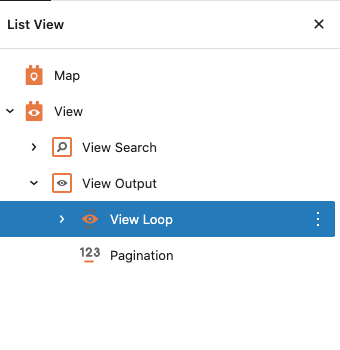
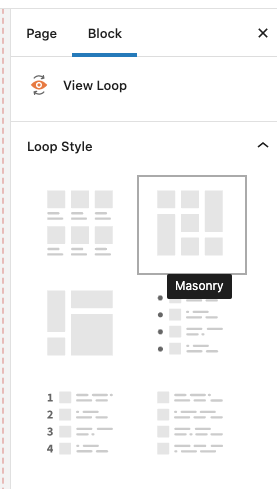
You can expand the Views block and click the Views Loop block to see the options on the sidebar.
There you will be able to select the Masonry option.
Please check the screenshots attached.
If you want to use Elementor with Toolset please check this documentation to know how to get started:
https://toolset.com/course-lesson/using-toolset-with-elementor-page-builder/
Thank you.
My issue is resolved now. Thank you!