Hi there,
I have set a relationship between 2 custom post types (Books & Authors). In a view for a book I like to show all related authors. I was following your documentation. It worked but unfortunately the authors are shown in separate lines if I use the "unformatted" loop style.
Is it possible to get in my example all authors in the 1 continuous line with separators between the authors like " | "?
Rgds,
Frank
Hi Katja,
Thank you for getting in touch.
Unfortunately there is no way to add this styling when you're using a the Block builder for Views. The only way you can achieve this is with the classic view setup.
If the classic view hasn't been enabled you can enable it by going to Toolset -> Settings and scrolling to Editing Experience. From there I recommend that you select " Show both the legacy and Blocks interface and let me choose which to use for each item I build".
This will allow you to have access to the classic editor as well as the block editor. From there refresh the page and go to Toolset -> Views.
When you create your classic view and select your post type to display and add your relationship filter under the query filter section, you will scroll down to the Loop Output section.
Since you're only displaying the Title of the author then you can just replace everything at <wpv-loop> with the ones below.
<wpv-loop>
            [wpv-item index=other]
                [wpv-post-title]|
            [wpv-item index=last]
                [wpv-post-title]
        </wpv-loop>
From there you can just go and re-add your view to the page using the view block. Please let me know if this is clear or if further clarification is needed.
Thanks,
Shane
Hi Shane,
THX for the help.
I made it 90% towards the solution I guess. Could you please help me for the last 10%?
I created the view that is filtered by the post-id. Secondly I called the view from the page by a short code, right?
I used: [wpv-view name="View_Autoren_eines_Buches_NV" ids="($wpv-post-id)"]
Unfortunately is ether shows all items or replies "No author found".
I guess a no brainer for you. Sorry for the UTS.
THX
Frank
Hi Frank,
You code is almost correct, however the format for the post id shortcode is incorrect. The correct format should be this below.
[wpv-view name="View_Autoren_eines_Buches_NV" ids="[wpv-post-id]"]
Please let me know if this helps.
Thanks,
Shane
Hi Shane,
I just thought it through and again reviewed other tickets and instructions to this topic. i am afraid there is no way with the classic tool.
I have 2 posts: Books (with an Post-ID for every book) and book authors (with Post-ID for ever book author)
I have set both in relationship n:m = many to many
So I guess I need 2 views (Parent - child):
Parent-View: to get all related Book-author-Post-IDs for a book-post-id.
Child-view: to get all author-names for the author-post-id and display them in a line devided by seperators.
I know how to create the parent/child view thing. But I cannot finde that related book-author-post-ID thing as field to select.
So I am stuck? Or is there a way to get access to the cross-table between the n:m relationship?
Rgds
Frank
Hi Frank,
Perhaps if I had a look at the page where you're working on this I can assist you better.
Would you mind allowing me to have admin access to the website so that I can have a more detailed look at this for you ?
Please where applicable please provide me with a link to an example page where I can see the issue.
I've enabled the private fields for your next response.
The visual display shouldn't be an issue because based on the setup it should display all your items in one line. Also are you viewing the book page and listing out the authors on the page ?
Thanks,
Shane
Hi Frank,
I've fixed the view for you now. If you check the page you should now see the authors being displayed at the bottom of the page. If you check a page with multiple authors then you will see the breadcrumbs type format.
enlace oculto
Please let me know if this helps.
Thanks,
Shane
Shane,
Hm. I am quite ashamed. But it is most times like this, right?. If you know the solution it always looks easy. But this one I should have been able to solve on my own. However I am more than happy with your solution!
Just maybe one last question. How can I call this view from another view? In the example above I am calling the view from a post-template. But this post-information seems to be lost if I call it from another view. Is the item-attribute the right one? But I don't know the syntax. Sorry for keep on bothering you.
UR fan
Frank
Hi Frank,
No worries it can happen to the best of us.
How can I call this view from another view? In the example above I am calling the view from a post-template. But this post-information seems to be lost if I call it from another view. Is the item-attribute the right one?
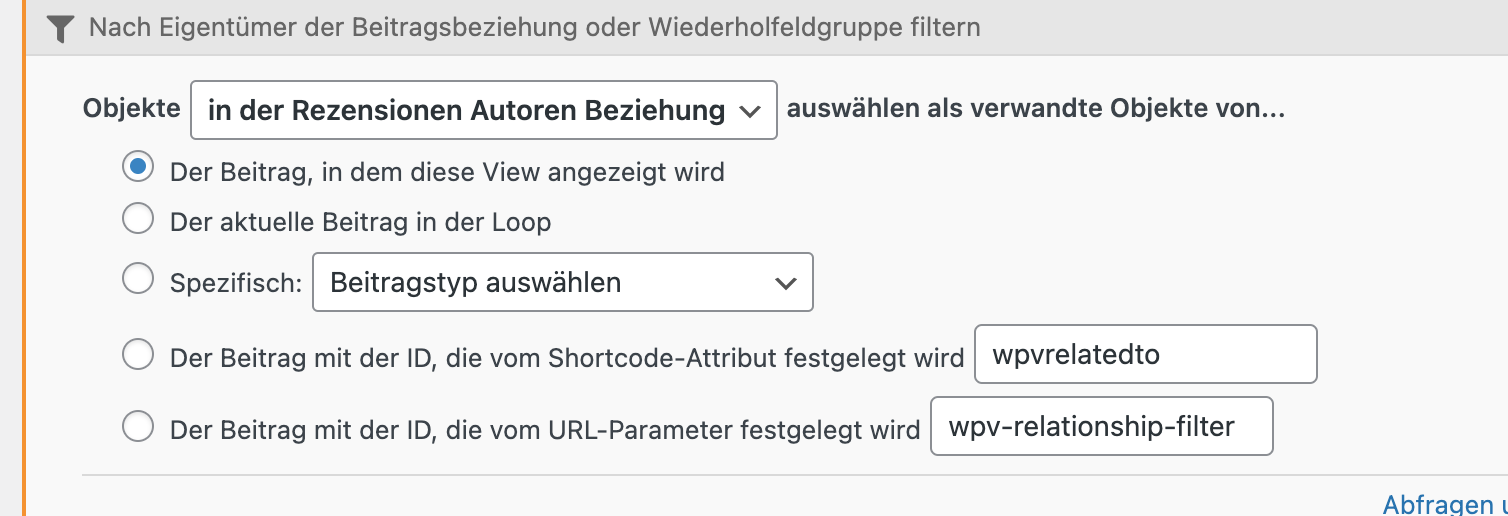
If you check on the view you will see a Post Relationship filter. I've set it to get the parent information from the current page. What you need to do is to change this and set it to get the information from the post loop. See Screenshot
Should you still want to use this view on the template then I would recommend cloning this view and then change the filter on the clone.
Thanks,
Shane
My issue is resolved now. Thank you!
The toolset service is the best - and Shane helped me to solve the problem by understanding the toolset functions much better, so that I can solve it next time alone. That's what I call a professional support!