Saltar navegación

[Cerrado] I need to have images popup in a lightbox

This is the technical support forum for Toolset - a suite of plugins for developing WordPress sites without writing PHP.

Everyone can read this forum, but only Toolset clients can post in it. Toolset support works 6 days per week, 19 hours per day.

Sun Mon Tue Wed Thu Fri Sat
- 9:00 – 12:00 9:00 – 12:00 9:00 – 12:00 9:00 – 12:00 9:00 – 12:00 -
- 13:00 – 18:00 13:00 – 18:00 13:00 – 18:00 13:00 – 18:00 13:00 – 18:00 -

Zona horaria del colaborador: America/Sao_Paulo (GMT-03:00)

Este tema contiene 4 respuestas, tiene 3 mensajes.

Última actualización por Mateus Getulio 1 year, 9 months ago.

Asistido por: Mateus Getulio.

Autor
Mensajes
#2726041

Tell us what you are trying to do? My client wants to have the same image popup in a lightbox. This is a nested view.

Is there any documentation that you are following? No.

Is there a similar example that we can see? No. Just a lightbox.

What is the link to your site? enlace oculto Scroll to the bottom and look at floorplans. Basically, need the best practice to have each image pop up in a lightbox.

#2726796

Nigel
Colaborador

Idiomas: Inglés (English ) Español (Español )

Zona horaria: Europe/London (GMT+01:00)

Screenshot 2024-08-22 at 09.01.56.png

Hi there

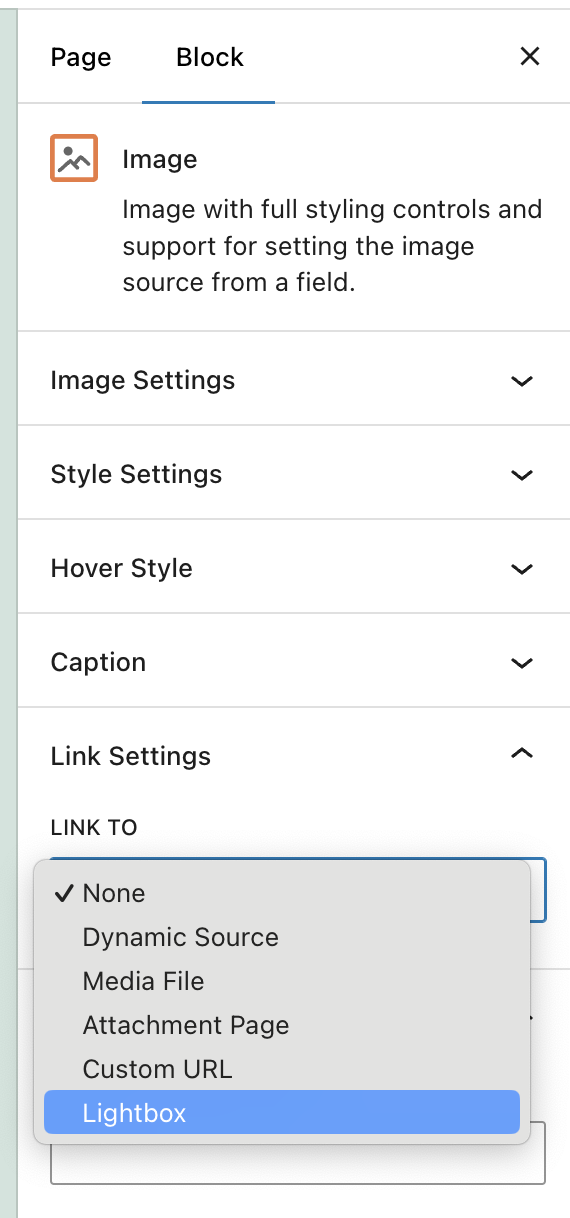
The Image Block settings includes the option to open images in a Lightbox (under Link Settings). See the screenshot.

#2727226

Thank you. I am used to using Views still. The block editor is good.

#2727251

Hey, I just looked over this and the image is a background and not an image. Do you have any thoughts on it? I presented two options, but I am curious if we would stick with the BG image and have it with a popup so they can benefit from CSS contain, etc, etc.

#2727577

Mateus Getulio
Colaborador

Idiomas: Inglés (English )

Zona horaria: America/Sao_Paulo (GMT-03:00)

Hello there,

To implement it on the legacy view, I suggest you try with WordPress built-in lightbox feature, for example:

1) Add below codes into your theme file "functions.php":

add_action('wp_enqueue_scripts', 'add_thickbox');

2) Edit your view, setup HTML link codes to display the feature image manually, for example:

for featured image:

<em><u>enlace oculto</u></em>

for custom image field:

<em><u>enlace oculto</u></em>

More help:
https://developer.wordpress.org/reference/functions/add_thickbox/
https://toolset.com/documentation/user-guides/views/views-shortcodes/#wpv-post-featured-image

Alternatively, you could also use a third-party solution for the lightbox like "WP jQuery Lightbox": https://wordpress.org/plugins/wp-jquery-lightbox/

Can you please check if this answer your question, please let me know otherwise and I'll reassess.

Thank you,
Mateus

El debate ‘[Cerrado] I need to have images popup in a lightbox’ está cerrado y no admite más respuestas.