Tell us what you are trying to do?
I am trying to follow the directions from the documentation but it is not working.
Is there any documentation that you are following? https://toolset.com/course-lesson/front-end-forms-for-repeatable-field-groups/
In the section: "Forms for Editing Values of Existing Repeatable Field Groups" at step 5 its says:
"Use the Block navigation button to select the View Loop block and add the Toolset Forms block. In the dialog that appears, select your form in the Edit Post Forms section."
i think that means just to insert a "Form" after the "View". It's not really stated clearly. When I do this I see the "View" on the front end properly, but the editing "form" displays as "Form type and post type do not match"
Hello. Thank you for contacting the Toolset support.
Can you please share bit more details - are you looking to add new repeating field group items or you want to exit the existing repeating field group items?
*** Please make a FULL BACKUP of your database and website.***
I would also eventually need to request temporary access (WP-Admin and FTP) to your site. Preferably to a test site where the problem has been replicated if possible in order to be of better help and check if some configurations might need to be changed.
I have set the next reply to private which means only you and I have access to it.
On project listing page, I've added the link "Add Talent":
=> enlace oculto
When you click on it, it will allow you to add talent to your selected project. For instance - lets click on the "Mock project" and it will redirect you on the following page:
=> enlace oculto
With above page - you can see at top of the page the form to add the new talent and before the form.
I've added the view that lists the existing talent belongs to this "Mock project" with "Edit" link (Please notice the "Query Filter" section)
=> enlace oculto
When you click on "Edit" it will allow you to Edit the selected talent.
thank you. the demo was helpful. i made some slight changes to your setup.
i moved your "add talent" button to the project pages (from the project archive page where you set it up).
But there seems to be a bug.
For example this project lists 3 people in the "Attached talent" section. enlace oculto
1.
but only the 1st 2 listed are for this particular project. as you can see if you click "edit" on the 3rd field Role "Boom" and anme "Wynonna" it takes to another project. so this person is not attached to the correct project.
2.
also, this same example project: enlace oculto
has a 4th empty line row in the table. if you use the "edit" button it will take you to another project again. but in this situation, assuming we get the talent for the correct project, how do we delete a field that is empty? i woudn't want to display this empty field if someone removed talent from a project.
But there seems to be a bug.
For example this project lists 3 people in the "Attached talent" section. enlace oculto
1.
but only the 1st 2 listed are for this particular project. as you can see if you click "edit" on the 3rd field Role "Boom" and anme "Wynonna" it takes to another project. so this person is not attached to the correct project.
=====>
Can you please check now: enlace oculto
- I can see now only Two related talent under the "Attached talent" section.
As you moved the view on the project page, I've adjust the view's Query Filter to:
=> enlace oculto
Filter by post relationship or repeatable fields group owner
Select items from the Talent group that are related to the Post where this View is shown
2.
also, this same example project: enlace oculto
has a 4th empty line row in the table. if you use the "edit" button it will take you to another project again. but in this situation, assuming we get the talent for the correct project, how do we delete a field that is empty? i woudn't want to display this empty field if someone removed talent from a project.
====>
That is also fixed as a result of fix of #1.
thank you.
for question 2, i see that on the backend as an admin i can delete an empty repeating field group, but can a user do that?
if someone decides to remove a role and name from the project, then it will list a blank role and the words "choose user" if they want to take the name out.
Hi.
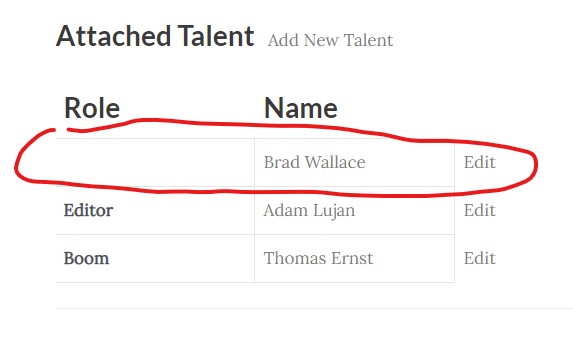
If a user enters a Role and a User Name, then decides to remove that entry then a blank entry is left over on the project page. a logged in user will see what i have screenshotted and attached. a logged out user will see a small empty row. in the screenshot, it is showing the admin name when no user is selected in the select field. how would a logged in user who is editing their own project go about removing the entry?
1.
you can see the empty row here: enlace oculto
2.
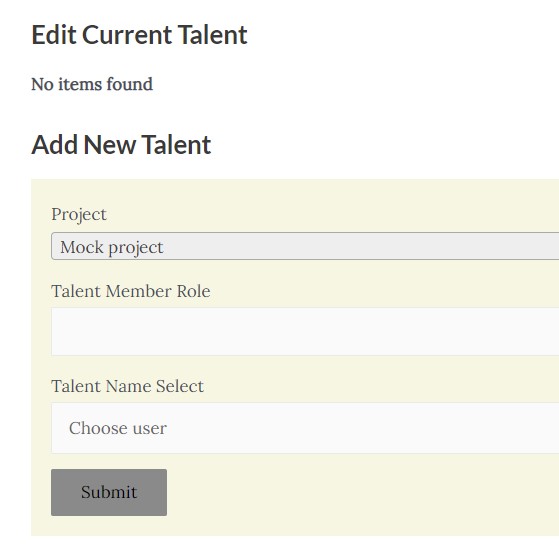
also on the same page, when you use the "add new talent" button, it takes you here: enlace oculto
and the now the section "edit current talent" says "no items found". so this section has stopped working now.
1.
you can see the empty row here: enlace oculto
=====>
As you can see in the backend:
=> enlace oculto
Within the "Talent" section it holds a entry that does not have "Talent Member Role" assigned that is why its displaying the blank entry as the first entry. You can remove the unwanted entry by deleting it. Please check the following screenshot:
=> enlace oculto
2.
also on the same page, when you use the "add new talent" button, it takes you here: enlace oculto
and the now the section "edit current talent" says "no items found". so this section has stopped working now.
====>
Can you please check now: enlace oculto
I've created the following view:
=> enlace oculto
And added the "Query Filter":
Filter by post relationship or repeatable fields group owner
Select items from the Talent group that are related to the Post with ID set by the URL parameter parent_project_id.
eg. <em><u>enlace oculto</u></em>
And then on the page where you are displaying the view I've replace the new view with the old one:
=> enlace oculto
I can see its working as expected - Can you please confirm its working as expected at your end as well.
1.
you can see the empty row here: enlace oculto
=====>
As you can see in the backend:
=> enlace oculto
Within the "Talent" section it holds a entry that does not have "Talent Member Role" assigned that is why its displaying the blank entry as the first entry. You can remove the unwanted entry by deleting it. Please check the following screenshot:
=> enlace oculto
2.
also on the same page, when you use the "add new talent" button, it takes you here: enlace oculto
and the now the section "edit current talent" says "no items found". so this section has stopped working now.
====>
Can you please check now: enlace oculto
I've created the following view:
=> enlace oculto
And added the "Query Filter":
Filter by post relationship or repeatable fields group owner
Select items from the Talent group that are related to the Post with ID set by the URL parameter parent_project_id.
eg. <em><u>enlace oculto</u></em>
And then on the page where you are displaying the view I've replace the new view with the old one:
=> enlace oculto
I can see its working as expected - Can you please confirm its working as expected at your end as well.