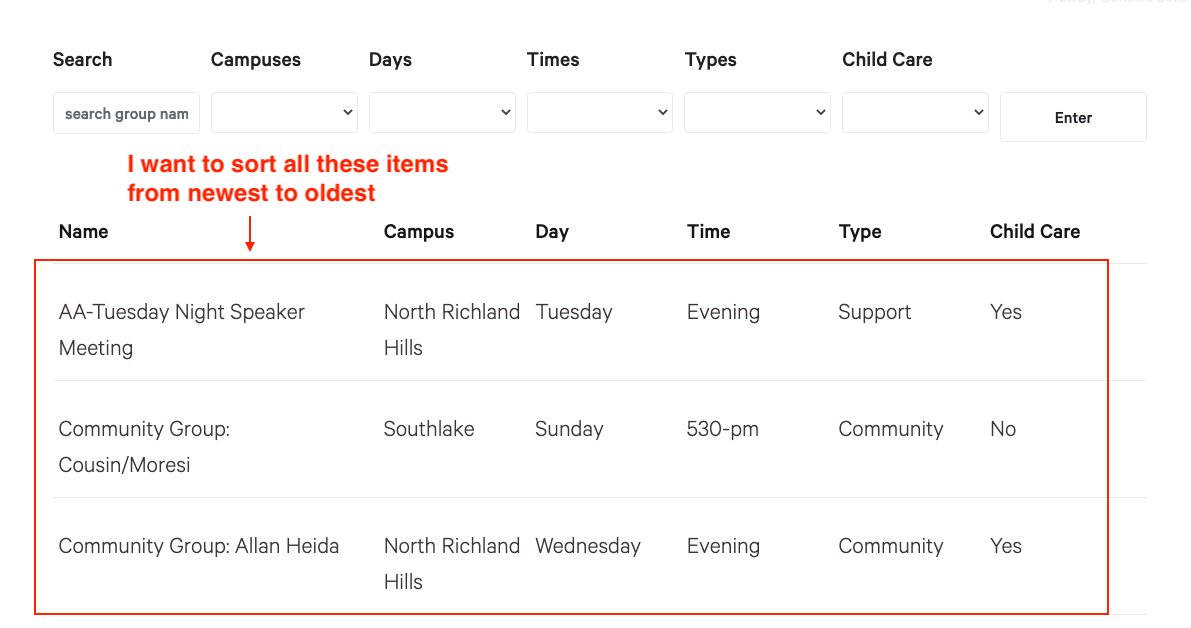
Tell us what you are trying to do?
I have an api setup that pulls group information to our website and I am using toolset to display this information that is being pulled. I have created a view for this groups page and currently it is displaying groups in alphabetical order. I would like them to display from newest added group to oldest added group.
Is there any documentation that you are following?
No
Is there a similar example that we can see?
No
What is the link to your site?
enlace oculto
This is my view:
[wpv-filter-start hide="false"]
[wpv-filter-controls]
<div class="form-groups">
<div class="form-group">
<label>[wpml-string context="wpv-views"]Search[/wpml-string]</label>
[wpv-filter-search-box placeholder="search group name" output="bootstrap"]
</div>
<div class="form-group">
<label>[wpml-string context="wpv-views"]Campuses[/wpml-string]</label>
[wpv-control-post-taxonomy taxonomy="event-campus" type="select" format="%%NAME%% (%%COUNT%%)" url_param="wpv-event-campus"]
</div>
<div class="form-group">
<label>[wpml-string context="wpv-views"]Days[/wpml-string]</label>
[wpv-control-post-taxonomy taxonomy="groups_day" type="select" format="%%NAME%% (%%COUNT%%)" url_param="wpv-groups_day"]
</div>
<div class="form-group">
<label>[wpml-string context="wpv-views"]Times[/wpml-string]</label>
[wpv-control-post-taxonomy taxonomy="groups_time" type="select" format="%%NAME%% (%%COUNT%%)" url_param="wpv-groups_time"]
</div>
<div class="form-group">
<label>[wpml-string context="wpv-views"]Types[/wpml-string]</label>
[wpv-control-post-taxonomy taxonomy="groups_type" type="select" format="%%NAME%% (%%COUNT%%)" url_param="wpv-groups_type"]
</div>
<div class="form-group">
<label>[wpml-string context="wpv-views"]Child Care[/wpml-string]</label>
[wpv-control-post-taxonomy taxonomy="groups_childcare" type="select" format="%%NAME%% (%%COUNT%%)" url_param="wpv-groups_childcare"]
</div>
<div class="form-group">
<label> </label>
[wpv-filter-submit name="Enter" output="bootstrap"]
[/wpv-filter-controls]
</div>
</div>
[wpv-filter-end]
Hello and thank you for contacting Toolset support.
You can add sorting to the view. If it is not visible on the view, activate it on the screen options. Check this screenshot enlace oculto
And choose "Post date" in the ordering option. Check this screenshot enlace oculto
If, on the other hand, you want to have sorting control in the view's search filters, you can add them with the sorting control button, and choose the post date for sorting. enlace oculto
I hope this helps. Let me know if you have any questions.