Saltar navegación

[Resuelto] How to display the top level of hierarchical posts in a view

This is the technical support forum for Toolset - a suite of plugins for developing WordPress sites without writing PHP.

Everyone can read this forum, but only Toolset clients can post in it. Toolset support works 6 days per week, 19 hours per day.

Sun Mon Tue Wed Thu Fri Sat
- 10:00 – 13:00 10:00 – 13:00 10:00 – 13:00 10:00 – 13:00 10:00 – 13:00 -
- 14:00 – 18:00 14:00 – 18:00 14:00 – 18:00 14:00 – 18:00 14:00 – 18:00 -

Zona horaria del colaborador: Asia/Kolkata (GMT+05:30)

Este tema contiene 1 respuesta, tiene 1 mensaje.

Última actualización por Saul Baizman 1 year, 4 months ago.

Asistido por: Minesh.

Autor
Mensajes
#2793427
screenshot 2025-01-21 at 23.07.37.png

Hi there,

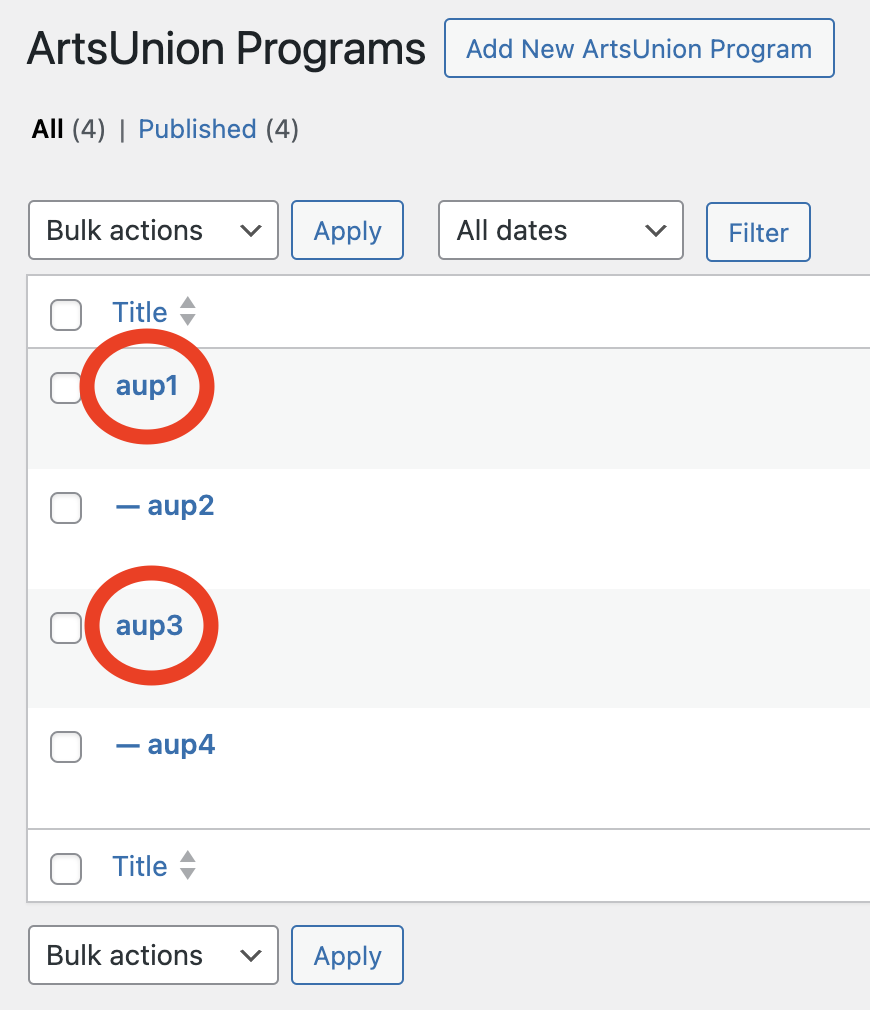
We have a custom post type named "ArtsUnion Programs." It's a hierarchical post allowing us to choose a post's parent.

What I would like to do is create a view to display only the top-level posts in the hierarchy. See the attached screenshot for an illustration, with the posts I want to display circled in red. (The posts not circled should not be displayed.)

How would I go about this?

Thank you!

Saul

#2793468

Minesh
Colaborador

Idiomas: Inglés (English )

Zona horaria: Asia/Kolkata (GMT+05:30)

Hello. Thank you for contacting the Toolset support.

You can add the Query Filter to your view and select the filter for post parent equal to No parent.

Please check the following Doc:
- https://toolset.com/course-lesson/filtering-custom-lists-of-posts/#filtering-by-post-parent

#2793571

Fantastic! Thanks, Minesh!

Saul