Good day,
I am trying to:
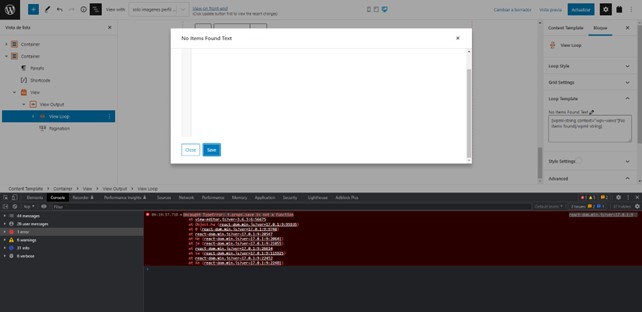
im trying to change the "no items found" in the loop template view but always get an error when i try to save changes.
The error is : react-dom.min.js?ver=17.0.1:9 Uncaught TypeError: t.props.save is not a function
Link to a page where the issue can be seen:
I expected to see:
Instead, I got:
Hi Sergio,
Thanks for getting in touch.
Thanks for the screenshot as well.
In a case like this when the plugins are not functioning as intended we recommended that you disable the non-toolset plugins.
What this means is that you will need to go through your list of plugins and disable each of your plugins one at a time while checking to see if the issue still remains.
Thanks,
Shane
Hello Shane amd thank you for the response,
I've deactivated all no-toolset plugins but the error remains.
I also change the template, activating the WordPress 20-22 theme but nothing happens. the error is the same:
"ERROR: react-dom.min.js?ver=17.0.1:9 Uncaught TypeError: t.props.save is not a function. "
it comes from : ( wp-includes/js/dist/vendor/react-dom.min.js?ver=17.0.1 ) path.
Hi Sergio,
Would you mind allowing me to have admin access to the website so that I can have a more detailed look at this for you ?
Please where applicable please provide me with a link to an example page where I can see the issue.
I've enabled the private fields for your next response.
Also I will need to grab a copy of the site as well to perform further testing locally should that be needed.
Please let me know if this is okay.
Thanks,
Shane
Hi Sergio,
I did a test on this view below.
enlace oculto
If you check the No Items Found section you will now see that the word "test" has been added.
I'm not experiencing any issues adding the text. Perhaps try doing it in a different browser?
Thanks,
Shane
Hello Shane! and thank you for your time helping me.
I tried to do the change in the loop template "No items found text", both in google and in firefox but still get the error when i try to save the change.
An example here:
enlace oculto
Hello Shane,
i just see the " no items found test" text that you talk about.
I've try to modify directly in the text-area without open the lightbox clicking in the pencil icon and I have not experienced any problems doing so.
At this point my conclusion is:
however there is the problem that I presented at the beginning but by making the change directly in the textarea and by updating the template, the change remains .
Thank you Shane!