Saltar navegación

[Resuelto] Duplicate custom field to select a custom post – displays "not set"

This support ticket is created 2 years, 11 months ago. There's a good chance that you are reading advice that it now obsolete.

This is the technical support forum for Toolset - a suite of plugins for developing WordPress sites without writing PHP.

Everyone can read this forum, but only Toolset clients can post in it. Toolset support works 6 days per week, 19 hours per day.

Sun Mon Tue Wed Thu Fri Sat
- 10:00 – 13:00 10:00 – 13:00 10:00 – 13:00 10:00 – 13:00 10:00 – 13:00 -
- 14:00 – 18:00 14:00 – 18:00 14:00 – 18:00 14:00 – 18:00 14:00 – 18:00 -

Zona horaria del colaborador: Asia/Kolkata (GMT+05:30)

Este tema contiene 5 respuestas, tiene 2 mensajes.

Última actualización por WillL606 2 years, 11 months ago.

Asistido por: Minesh.

Autor
Mensajes
#2619433
Screen Shot 2023-06-27 at 12.07.55 PM.png
Screen Shot 2023-06-27 at 12.00.40 PM.png
Screen Shot 2023-06-27 at 12.01.50 PM.png

Tell us what you are trying to do?
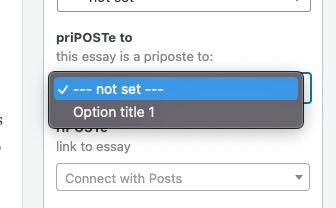
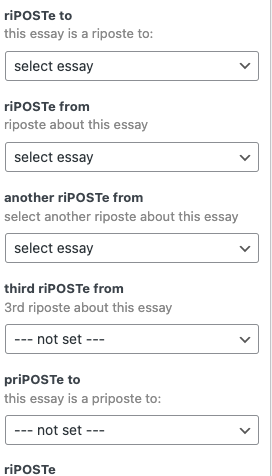
Duplicated a working custom field to select a custom post. Adjusted the naming of the duplicate View for what to do with this field . But I can't get the new custom field to show a dropdown menu. It says "Not Set"

Is there any documentation that you are following?

Is there a similar example that we can see?
The two images show the custom fields, working and not working and the View Loop output for what to do with the custom field once the post is selected. I think the problem is in showing the dropdown menu.

What is the link to your site?
enlace oculto

#2619587

Minesh
Colaborador

Idiomas: Inglés (English )

Zona horaria: Asia/Kolkata (GMT+05:30)

Hello. Thank you for contacting the Toolset support.

I would like to know how exactly you duplicate the custom field? Can you please tell me what steps exactly you follow and with what link and share problem URL and tell me what fields you want to display where?

*** Please make a FULL BACKUP of your database and website.***
I would also eventually need to request temporary access (WP-Admin and FTP) to your site. Preferably to a test site where the problem has been replicated if possible in order to be of better help and check if some configurations might need to be changed.

I have set the next reply to private which means only you and I have access to it.

#2619851

Minesh
Colaborador

Idiomas: Inglés (English )

Zona horaria: Asia/Kolkata (GMT+05:30)

I can see you are using the following view:
=> enlace oculto

The above view is set to display only one item.

Do you want to use above view to display the select box as well?

Where I can see the view with select box?

#2619873

The dropdown on the custom field shows all essay chronologically, but you only select one.

At the top pf this page enlace oculto
you can see "A riPOSTe to: Thoughts on the Textpocalypse"
That is what the View displays, the selected essay that the current essay is a comments on.

Edit this essay and you will see a sidebar of settings - including the custom fields. this works as a "riPOSTe to". Further down a 'priPOSTe to" custom field does not have a dropdown to select an essay. It say NOT SET.

#2619875

Minesh
Colaborador

Idiomas: Inglés (English )

Zona horaria: Asia/Kolkata (GMT+05:30)

I can see that you are prepopulating the options for those select fields using the hook "wpt_field_options" which is added to your current theme's functions.php file.

So, if you want the same options for both the fields (riPOSTe to and priPOSTe to), (I've added the following line of the code to the following code which is added to your functions.php file:

 case 'priPOSTe to':

So, the final code looks like:

add_filter( 'wpt_field_options', 'func_dynamic_populate_essay', 10, 3);
function func_dynamic_populate_essay( $options, $title, $type ){
    switch( $title ){
        case 'riPOSTe to':
	case 'priPOSTe to':
            $options = array();
            $args = array(
                'post_type' => 'essay',
                'numberposts' => -1,
                'post_status' => 'publish');
 
           
            $posts_array = get_posts( $args );
 
            // adding default option  
             $options[] = array(
                    '#value' => 0,
                    '#title' => "select essay",
                );
            foreach ($posts_array as $post) {
                $options[] = array(
                    '#value' => $post->ID,
                    '#title' => $post->post_title,
                );
            }
            break;
    }
    return $options;
}

For other fields where applicable you should modify such related filter code for your desired field.

I can see ow on Edit essay page: enlace oculto
- The dropdown does populated the options for the field "priPOSTe to".

#2620115

The dropdown on the custom field shows all essay chronologically, but you only select one.

At the top pf this page enlace oculto
you can see "A riPOSTe to: Thoughts on the Textpocalypse"
That is what the View displays, the selected essay that the current essay is a comments on.

Edit this essay and you will see a sidebar of settings - including the custom fields. this works as a "riPOSTe to". Further down a 'priPOSTe to" custom field does not have a dropdown to select an essay. It says NOT SET.