Saltar navegación

[Cerrado] Determine Ordering of Content Template

This support ticket is created 3 years, 11 months ago. There's a good chance that you are reading advice that it now obsolete.

This is the technical support forum for Toolset - a suite of plugins for developing WordPress sites without writing PHP.

Everyone can read this forum, but only Toolset clients can post in it. Toolset support works 6 days per week, 19 hours per day.

Este tema contiene 1 respuesta, tiene 2 mensajes.

Última actualización por Christopher Amirian 3 years, 11 months ago.

Asistido por: Christopher Amirian.

Autor
Mensajes
#2427927

Tell us what you are trying to do? determine the ordering scheme for dynamic content on this page: enlace oculto

Is there any documentation that you are following? I've tried looking this up with google but I'm having trouble finding relevant documentation pages.

All of the dynamic content items on this page all share the "Casino" page as a parent (linked above). Beyond that, I have no idea how this is being ordered, I tried checking title, slug, publish date, order page attribute and ID, it doesn't seem to be ordering it by any of these.

#2428321

Christopher Amirian
Colaborador

Idiomas: Inglés (English )

view.png
ordering.png

Hi there,

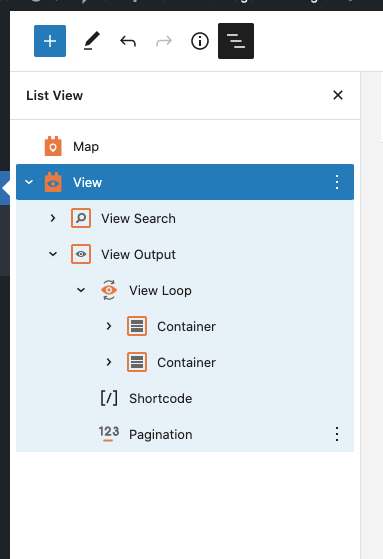
Please go to the edit screen of the page in question and click on the VIEW block in the block editor.

From the top left section click the Three Dots icon to show the hierarchy of the blocks. Select the View blog from there. (view.png)

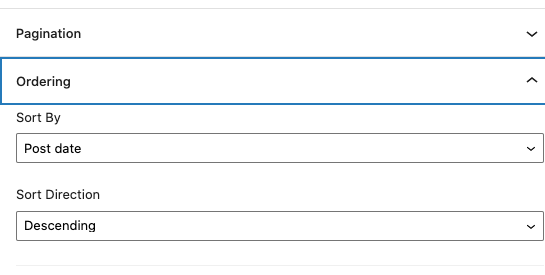
Then on the right sidebar, check the Ordering section and there you can set the ordering of the posts that you show in the view. (ordering.png)

Thank you

El debate ‘[Cerrado] Determine Ordering of Content Template’ está cerrado y no admite más respuestas.