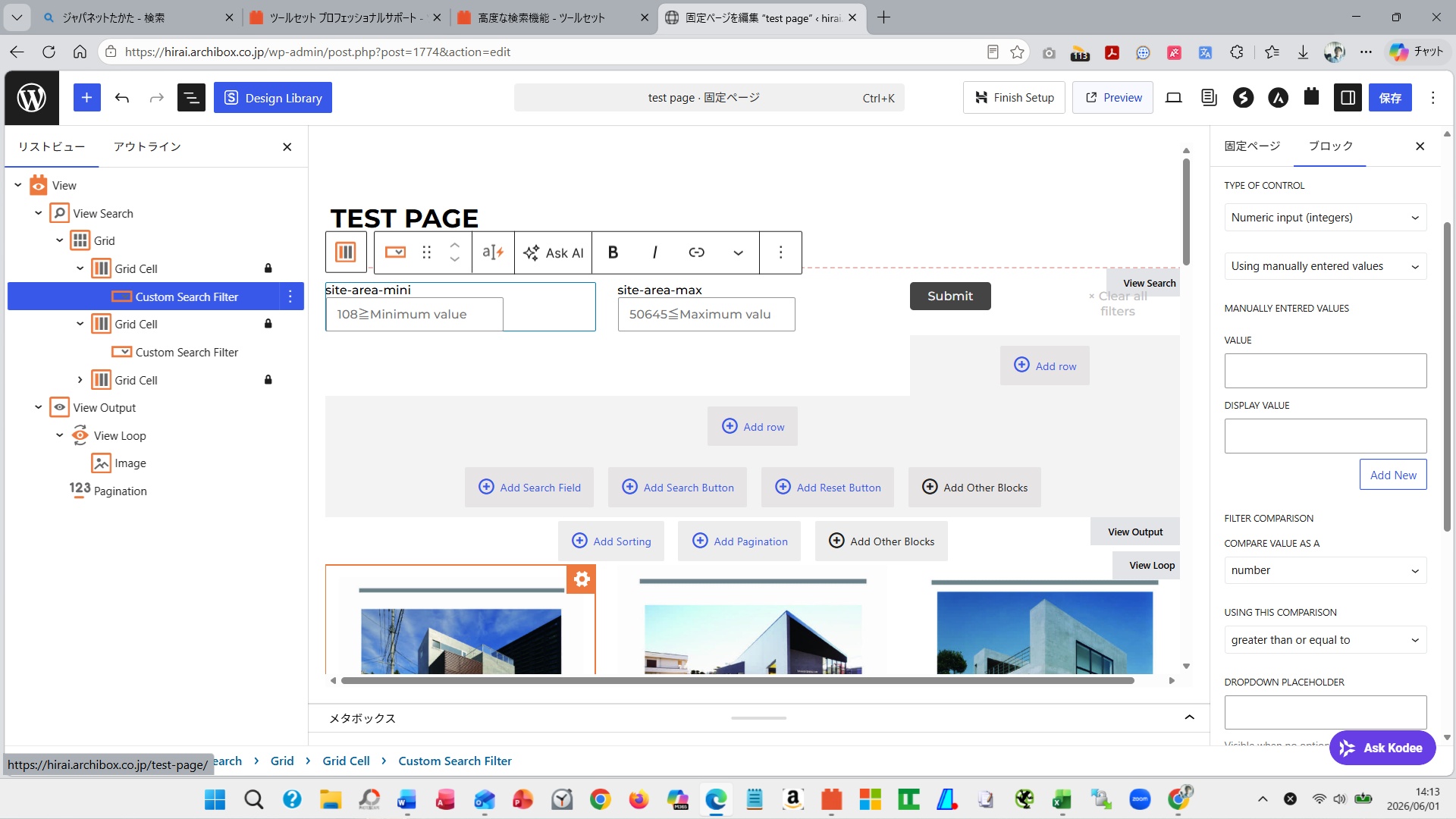
I would like to request support regarding the search function.
I am currently building a website for an architectural design firm.
I am trying to implement a search function for the buildings I have designed.
The custom fields for buildings include site area, building area, and total floor area.
I would like to allow searching by a single custom field, site area.
Therefore, I would like to implement a search function where the user can enter a minimum and maximum value for the site area, and then view buildings within that range.
The settings for implementing the search function are as follows:
1. I set a View on Testpage.
2. View > Content Selection > Query Filter
3. Query Filter>Condition
3-1) Condition: is greater than or equal to
3-2) Value: URL parameter
3-3) Parameter name: site-area-min
3-4) Condition: is less than or equal to
3-5) Value: URL parameter
3-6) Parameter name: site-area-max
4. Custom Search Filter>Field = site-area>Next
4-1) Type of control = numeric input, using manually entered value
4-2) Filter comparison>Compare value as a=number
4-3) Using this comparison=is greater than or equal to
4-4) URL parameter = site-area-min
4-5) Type of control = numeric input, using manually entered value
4-6) Filter comparison>Compare value as a=number
4-7) Using this comparison=is lower than or equal to
4-8) URL parameter = site-area-max
Testing the search function by entering minimum and maximum values resulted in the search not working correctly.
What I most want to achieve is not so much precise searching, but rather providing end-users with a certain degree of filtering (range) to give them an opportunity to make a decision.
Why does Toolset recommend doing the following?
Query Filter (Logic)
• site-area ≥ URL parameter: site-area-min
• site-area ≤ URL parameter: site-area-max
Search Filter (UI)
• Minimum value input field (URL param: site-area-min)
• Maximum value input field (URL param: site-area-max)
With only the above settings, it displays everything instead of presenting a range, so it doesn't seem to be filtering effectively. Therefore, I would like you to help me find a way to achieve my goal using only Toolset by making some further settings. Thank you for your support.
I'm sending you a screenshot of my current settings; please help me with this.
Thank you for contacting me.
I apologize for any confusion you may have experienced.
However, I would like you to understand the following:
1. I understand your previous support.
2. You requested that I create a new ticket if you had any questions beyond the previous support. I fully understand that.
3. You understand that your previous question and this question are the same.
4. I believe this is what caused the confusion.
5. There are three reasons why I created a new ticket:
5-1) I am dissatisfied with the solution provided by the code configuration. I am seeking a no-code solution. This is why I created a new ticket.
5-2) I believe I have clearly explained the method recommended by the Toolset in my current question.
5-3) The method recommended by Toolset (which I believe is part of the Toolset design philosophy) is:
① Query Filter (Logic)
site-area ≥ URL parameter: site-area-min
site-area ≤ URL parameter: site-area-max
② Search Filter (UI)
Site area (minimum) → site-area-min
Site area (maximum) → site-area-max
By setting these,
・Enter only the minimum value → Display only properties greater than or equal to that value
・Enter only the maximum value → Display only properties less than or equal to that value
・Enter both → Display only properties within the range
・Leave both blank → Display all results
I believe this behavior is the standard specification of Toolset itself.
6. Therefore, I am confident that by following the standard specification, it is possible to filter the desired properties without coding. I believe that achieving this is more valuable to me.
7. I apologize for confusing you, but I would be truly grateful if you could understand my point.
8. If you do not wish to answer any further questions from me, or if you find them difficult to understand, please feel free to direct your questions to other supporters.
9. I look forward to your continued understanding and support.
Regarding your explanation, "We have a range filter without code bubt, then you have to input both min and max values for the range filter," could you please explain this in more detail?
In other words, my understanding is as follows:
1. If I input both a minimum value (e.g., 100) and a maximum value (e.g., 500) simultaneously, it will filter all buildings between 100 and 500.
2. If the above (1) is possible without coding, I believe my objective has been achieved.
Is my understanding of your explanation, "We have a range filter without code bubt, then you have to input both min and max values for the range filter," correct?
1. If I input both a minimum value (e.g., 100) and a maximum value (e.g., 500) simultaneously, it will filter all buildings between 100 and 500.
==>
Yes - that's correct.
2. If the above (1) is possible without coding, I believe my objective has been achieved.
==>
Ok
But your requirement before is if you enter minimum value 100 and skip maximum value then it will not work. You can not skip either minimum or maximum value. I hope that makes sense.