This is the technical support forum for Toolset - a suite of plugins for developing WordPress sites without writing PHP.
Everyone can read this forum, but only Toolset clients can post in it. Toolset support works 6 days per week, 19 hours per day.
Este tema contiene 3 replies, tiene 1 mensaje.
Última actualización por - 19 hours, 37 minutes ago.
Asistido por: Christopher Amirian.

Hello,
I believe found a bug/issue with conditional when working with [toolset-maps-distance-value] inside [wpv-geolocation].
I have a view that calculates the distance between the visitor location and a post address to check if geolocation consent is active:
[wpv-geolocation]
    [wpv-conditional if="( '[toolset-maps-distance-value origin_source='visitor_location' postmeta='wpcf-user-address']' ne '' )"]
        [toolset-maps-distance-value origin_source='visitor_location' postmeta='wpcf-user-address']
    [/wpv-conditional]
    [wpv-conditional if="( '[toolset-maps-distance-value origin_source='visitor_location' postmeta='wpcf-user-address']' eq '' )"]
        [toolset-maps-distance-value origin_source='visitor_location' postmeta='wpcf-user-address']
    [/wpv-conditional]
[/wpv-geolocation]
The issue:
1. Testing the positive condition (ne '') works fine. It returns Y and all geolocated elements are displayed.
2. However, whenever a negative condition checking for empty value (eq '') is present, the browser location consent box never triggers, and none of the non-geolocated elements is shown on the page.
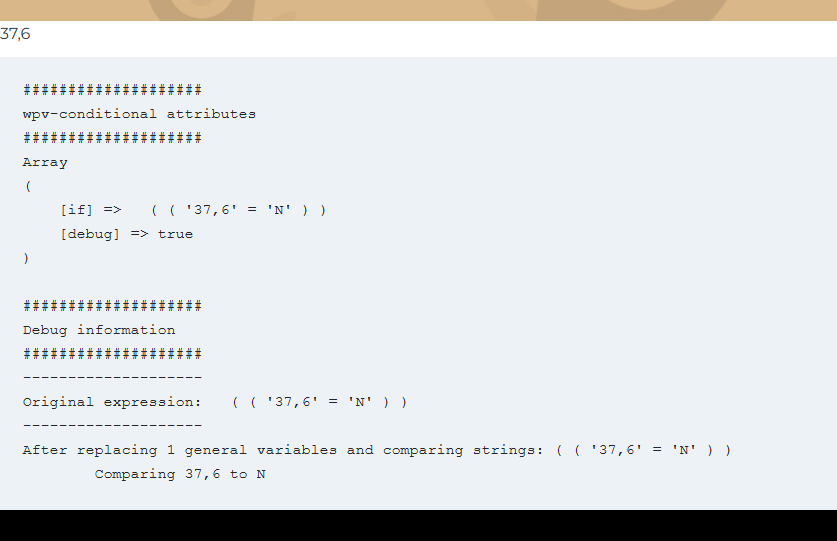
3. I enabled [wpv-conditional debug="true"] (see picture) and inspected the debug log. The parser evaluates the expression as: Original expression: ( ( '37,6' = 'N' ) ) comparing 37,6 to N ! this makes no sense at all !
It looks like the conditional is incorrectly trying to compare a calculated distance (e.g. 37,6) directly against 'N'. This breaks something in the [wpv-geolocation] and prevents the native browser consent box from showing.
To get the browsing consent box back the only solution is to remove the conditional testing for N, but in this way there is no way to show other elements when the consent is denied.
This issue didn't happen some times ago (sorry, can't tell with which version of Maps it was working fine, but it was), the view returned N. Did you change anything in Toolset Maps? Is there any other way to show non-geolocated elements/block if the user denies consent? please check and let me know
thanks
Kind Regards
Nicola



Hello Nicola,
Thank you for the details.
The content inside [wpv-geolocation] is only shown after the visitor shares their location. Before that, the shortcode shows the "location needed" message and asks the browser for the location. Once the location is known, the distance always has a value. So a check for an empty distance inside [wpv-geolocation] can never be true.
To show other content to visitors who did not share their location, put that check outside the [wpv-geolocation] block:
[wpv-geolocation]
  [wpv-conditional if="( '[toolset-maps-distance-value origin_source='visitor_location' postmeta='wpcf-user-address']' ne '' )"]
    [toolset-maps-distance-value origin_source='visitor_location' postmeta='wpcf-user-address']
  [/wpv-conditional]
[/wpv-geolocation]
[wpv-conditional if="( '[toolset-maps-distance-value origin_source='visitor_location' postmeta='wpcf-user-address']' eq '' )"]
  Your content for visitors without a shared location
[/wpv-conditional]
Please also make sure "toolset-maps-distance-value" is listed in Toolset > Settings > Front-end Content > Third-party shortcode arguments. Without it, the conditional cannot read the distance.
If the browser does not ask for the location at all, please check the site's location permission in your browser. Once a site is blocked, the browser does not ask again. You can also test in a private window.
Thanks.
Hi Christian,
Thanks for the reply, though I think there is a misunderstanding about the actual issue I am facing. The solution you are giving is exactly how the conditional SHOULD behave, but my ticket is about the fact that it does not.
I already know how [wpv-geolocation] works and toolset-maps-distance-value is already properly registered in the Front-end Content settings. The real problem is that I need to apply conditional visibility across many pages, and obviously my homepage is where the user decides whether to give consent or not. To trigger the browser consent prompt, placing a geolocalized shortcode at the top of the page is enough. The View (code above) tries to calculate a distance: if it succeeds, it means the user has given consent (the View got the user's position and calculated the distance); if not, it should return blank. To test this output through conditionals, I set the View to return Y if it can calculate a distance, or N if it cannot. Further down the page(s), I test Y/N with conditionals to show geolocalized content (map, etc.) if Y, or other non-geolocalized content if N. This is what SHOULD happen, even according to your own code above.
What happens instead is this: if the user gives consent, everything works fine and the Y conditional shows its geolocalized content with no problem. However, if the user denies consent, the conditional testing N fails to display the alternative content. Not only that: even if the user gave consent, the mere presence of the negative conditional block on the page is enough to prevent the geolocalized content from showing AND stops the browser consent box from triggering at all! Deleting the negative block restores the positive side back to normal, while the negative side still never displays.
Before the recent Maps updates, this worked for both Y and N. Since the introduction of the "location needed" message, the N side has stopped working completely. Hiding that message with display:none does not change the behavior. I really don't understand why this message was introduced, as it clearly isn't "just a message" (furthermore, clicking the button inside that message does nothing.....) The only thing that matters when handling geolocation is being able to detect the user's choice in the browser's native consent box, nothing else. Once that is detected, the conditionals should work accordingly.
Please let me know.
Thanks
Regards

Christopher Amirian
Hello Nicola,
Thank you.
The code in your first message is different from the setup you describe. For example, the debug output compares the distance with 'N', so your conditionals test the result of the View, not the distance directly. To check this correctly, I need to see the real setup on your site.
The "Share my location" button inside the message should open the browser's location prompt immediately. If it does nothing on your site, there may be a JavaScript error on the page, and I would like to check that too.
Could you please give me temporary admin access to the site? Please set the next reply as private.
Please also include:
1. The URL of the homepage and of one other page where the Y/N conditionals are used.
2. The name of the View that returns Y or N.
3. Whether you see any errors in the browser console (right-click on the page > Inspect > Console) when you click "Share my location".
Thanks.


