Tell us what you are trying to do?
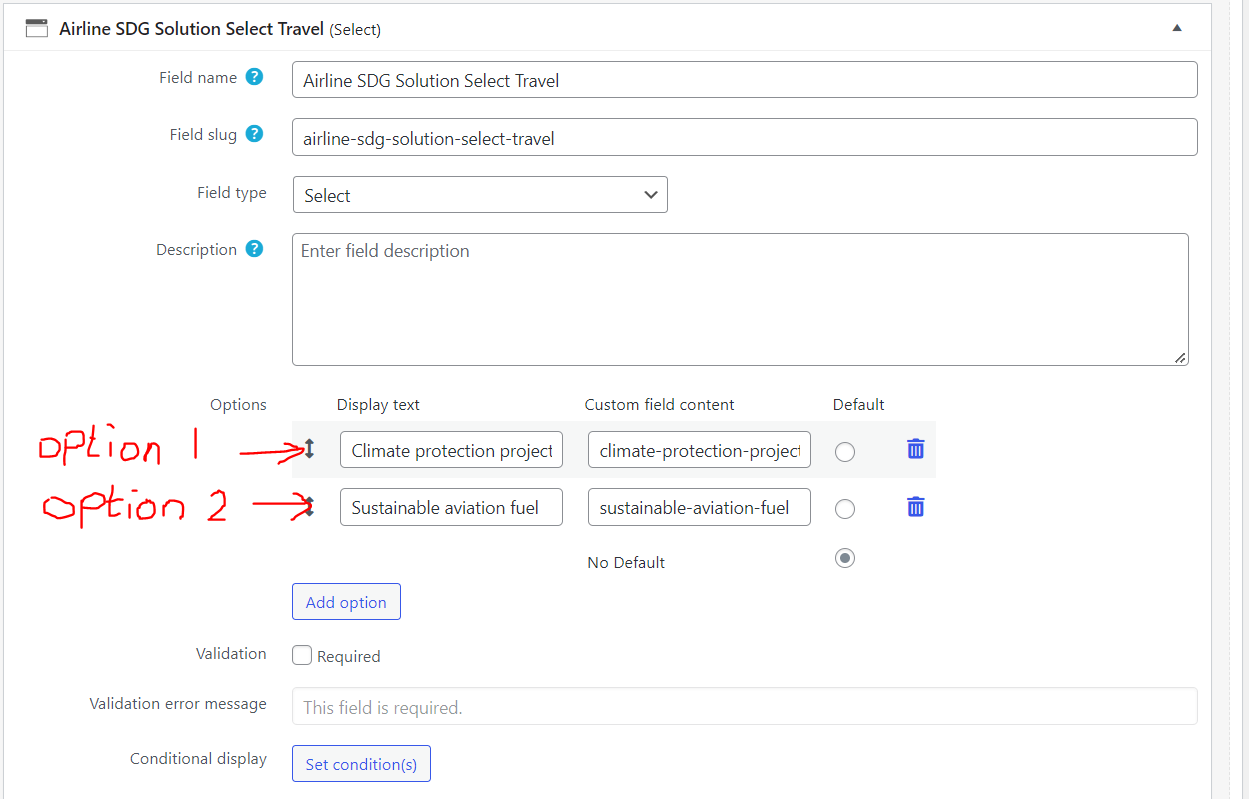
I have created a view from a repeatable group with SELECT custom field (screenshots). The SELECT custom field has few options (screenshot). The options in the SELECT are solutions to a problem (climate change).
SELECT
Option 1 = Climate protection projects
Option 2 = Sustainable aviation fuel
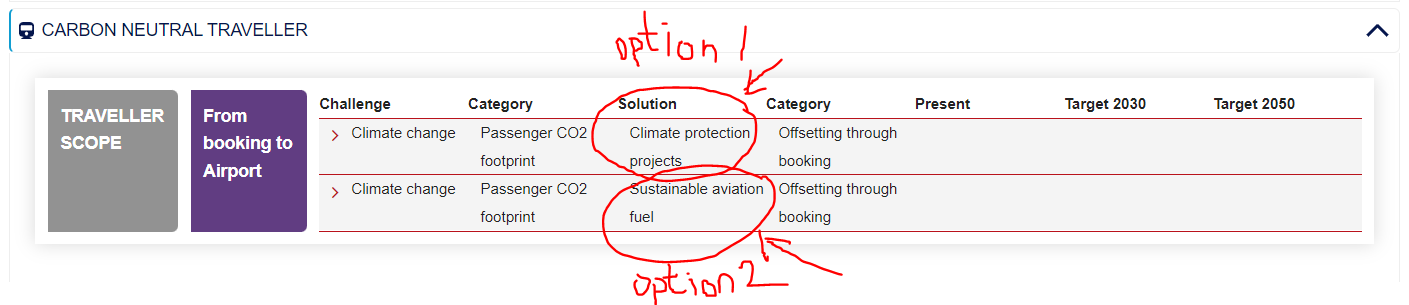
In the front end, if the company (custom post) has implemented this solution (option of SELECT) the solution is listed in a table in the front end - screenshot.
If the company has not implemented the solution (option of SELECT) then the solution (an option of SELECT) is empty and nothing will be listed in the front end (or the word "empty" is listed) - screenshot.
What I want to do next is to create another view to be used elsewhere on the site using conditional at the options level of the SELECT, namely the solutions option 1 and/or option 2
SELECT
Option 1 = Climate protection projects
Option 2 = Sustainable aviation fuel
The condition must check if the company has implemented this solution (if option in SELECT is not empty), the condition must show something (a green div for instance or some text). If the company has not implemented this solution (if option in SELECT is empty) then the condition must show something else (a red div for instance or some text)
Is this doable? I couldn't see any examples of how to apply conditional at the option level of a SELECT.
Your feedback and advise is highly appreciated
What is the link to your site?
Hello,
You can display different contents on the field value, see our document:
https://toolset.com/documentation/user-guides/views-shortcodes/#wpv-conditional
For example:
[wpv-conditional if="( $(wpcf-test-seletct-1) eq 'Option-1' )"]
Option 1 selected
[/wpv-conditional]
[wpv-conditional if="( $(wpcf-test-seletct-1) eq 'Option-2' )"]
Option 2 selected
[/wpv-conditional]
[wpv-conditional if="( $(wpcf-test-seletct-1) eq '' )"]
Non option selected
[/wpv-conditional]
Dear Luo Yang
I have run into several issues with implementing the if statement to the option level (custom field content) of the SELECT in the example above.
Without going to much into the details , I have one specific question at this stage:
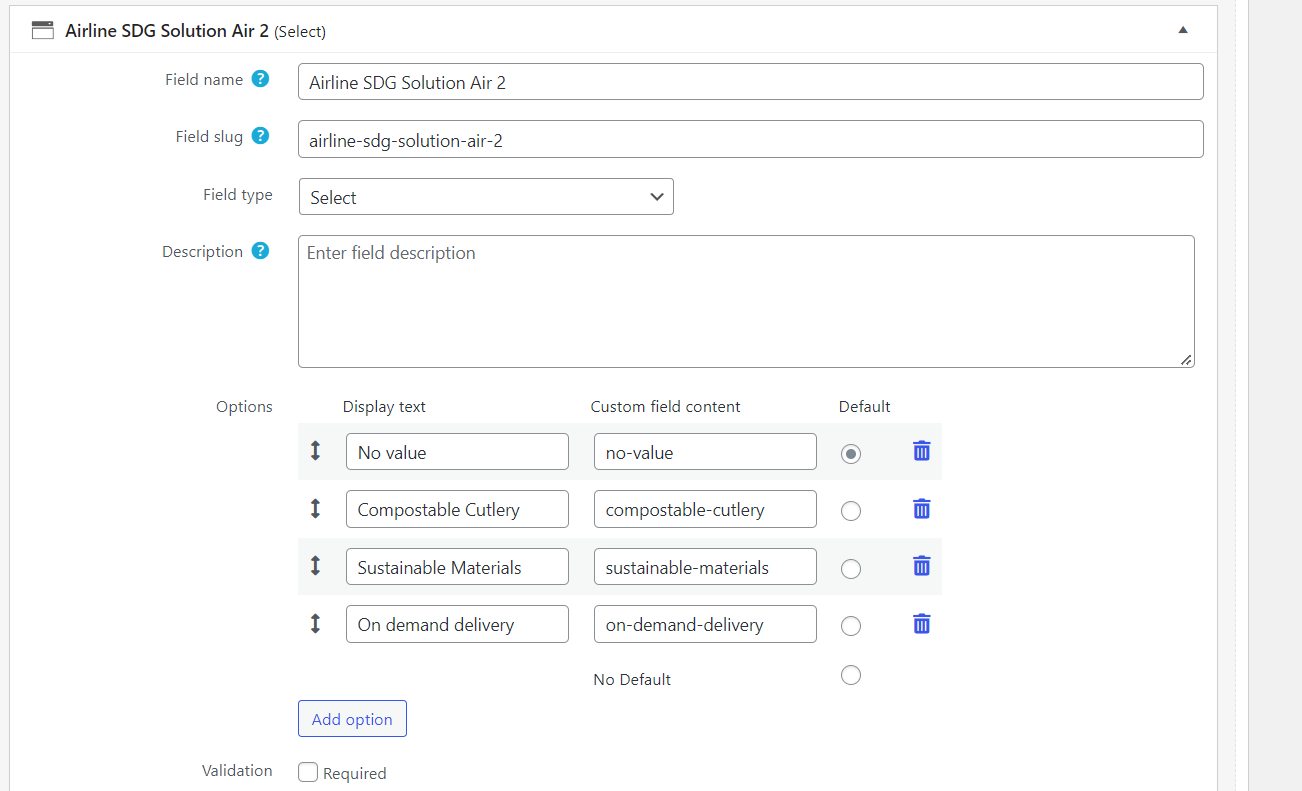
I have a repeatable group with slug name: airline-sdg-solution-air-2
inside of this group there is a SELECT with three solutions (options)
1- Compostable Cutlery - option-1
2- Sustainable Materials - option-2
3- On demand delivery - option-3
I just want to simply print/display on the front end only one custom field content. For instance to display the first custom field content if the company has implemented the first option, namely; Compostable Cutlery - option-1
Is there a shortcode to display option-1 from the SELECT in the repeatable group? What is the shortcode that displays option one for example
because this shortcode [types field='airline-sdg-solution-air-2'][/types] lists all of the options above which I don't want. I want to deal with the different options in a separate manner.
I have tried the [wpv-conditional] shortcode, it works fine, see below test site:
Login URL:
enlace oculto
1) Custom post type "Company":
enlace oculto
2) Custom repeatable field group with select field "airline-sdg-solution-air-2":
enlace oculto
3) Create a post view:
enlace oculto
- Query items of repeatable field group
- Filter by:
Select items from the company rfg group that are related to the Post where this View is shown.
- In view's loop, display the [wpv-conditional] shortcode:
				[wpv-conditional if="( $(wpcf-airline-sdg-solution-air-2) eq 'no-value' )"]
                no-value selected
                [/wpv-conditional]
                [wpv-conditional if="( $(wpcf-airline-sdg-solution-air-2) eq 'compostable-cutlery' )"]
                compostable-cutlery selected
                [/wpv-conditional]
                [wpv-conditional if="( $(wpcf-airline-sdg-solution-air-2) eq 'sustainable-materials' )"]
                sustainable-materials selected
                [/wpv-conditional]
4) Create a test company post, and display above post view:
enlace oculto
Test it in frontend:
enlace oculto
It works fine, is there any missing steps?
Thank you dear Luo Yang for the clear explanation. I really appreciate your help.
I would like to keep this ticket open until I implement the solution with your advised steps.
I will come back here in the coming days with my findings.
Thanks in advance for your patience and help
I have marked this thread as "Waiting for feedback" status, you can update here if you still need more assistance for it.