I am trying to:
Use grid with 36% and 64%
Link to a page where the issue can be seen:
enlace oculto
I expected to see:
Correct display on frontend.
Instead, I got:
Grid with 50% and 50% on frontend.
I reported this problem in this thread:
https://toolset.com/forums/topic/problem-with-showing-grid-on-frontend-and-with-lightbox-on-images/
But advices to removing the existing grids and recreate them not resolved my problems.
Now I installed brand new instance of WordPress with Astra and Toolset Blocks and this issue still exist.
Maybe some help for you will be that I think that it appeared probably after upgrade PHP to 7.4 version.
On two of my other sites builded on Avada theme I had to add this code to function.php:
add_action( 'avada_before_body_content', 'decimalfix' );
function decimalfix() {
setlocale(LC_ALL, 'en_US');
}

Nigel
Colaborador
Idiomas:
Inglés (English )
Español (Español )
Zona horaria:
Europe/London (GMT+00:00)
I can see the problem.
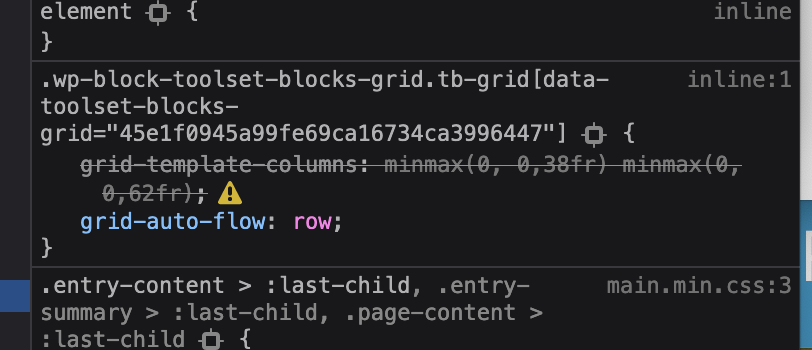
On the front end the CSS rule which sets the size of the columns is invalid, see the screenshot, which shows it greyed-out.
That's because this
grid-template-columns: minmax(0, 0,38fr) minmax(0, 0,62fr)
[php]

should look like

[php]
grid-template-columns: minmax(0,0.38fr) minmax(0,0.62fr)
That does look like a problem where the decimals like "0.62" are being output as "0,62", because of a locale setting.
Let me look into this a bit more and I'll see what I can find.
Of course. Just do what you think.
I will wait 🙂
Nigel
Colaborador
Idiomas:
Inglés (English )
Español (Español )
Zona horaria:
Europe/London (GMT+00:00)
I was unable to reproduce the problem, so I copied your site and installed it locally so that I could do some more testing.
But on the locally installed copy it works fine, the issue doesn't appear.
So it must be related to some settings on your server.
Could you create a file called phpinfo.php with the contents below and add it to your root directory.
Let me know when you've done that and then I can visit it to check your server configuration, to see if I can spot the problem.
Done. I just uploaded phpinfo.php file.
Nigel
Colaborador
Idiomas:
Inglés (English )
Español (Español )
Zona horaria:
Europe/London (GMT+00:00)
Thanks. It doesn't reveal anything obvious.
I'm debugging on my local site to try and identify where the problem could be introduced (I don't have the issue locally, but I can follow the flow of the code, and it's not easy to debug the site on your remote server).
I don't have any news for yet, but I'll get back to you when I do.
Could you please intensify your work on finding a solution to this bug? I raported this problem first time at 20 July. 🙁
It makes it very difficult for me to create new pages with Toolset and my clients keep asking when I will repair the existing ones.
Pretty please, so much!
Best regards!
Zbyszek
Nigel
Colaborador
Idiomas:
Inglés (English )
Español (Español )
Zona horaria:
Europe/London (GMT+00:00)
I have now escalated this to the developers, I was unable to get to the bottom of the problem myself. I spent some time with one of the developers this morning looking into it together, but they were unable to quickly identify the cause.
It is now in the queue of development tickets, so I can't say how long it will take for them to resolve the problem, but they typically prioritise issues affecting many clients, and this problem only occurs on your server.
I created a copy of your site on a sandbox server so that you can see it working normally: enlace oculto
As it may be a while before a solution from our developers, you may want to add some CSS directly yourself to force the correct sizing of the grid.
It should be enough to add something like the following in an HTML block lower in the page than the grid:
.wp-block-toolset-blocks-grid.tb-grid {
    grid-template-columns: minmax(0, 0.38fr) minmax(0, 0.62fr)!important;
}
If you have multiple grid blocks on the same page, you'd need to add a custom CSS class or ID to the grid block to help you target it with CSS.
I found solution! 🙂
You have to add:
setlocale(LC_ALL, 'en_US.utf8');
in wp-config.php file.