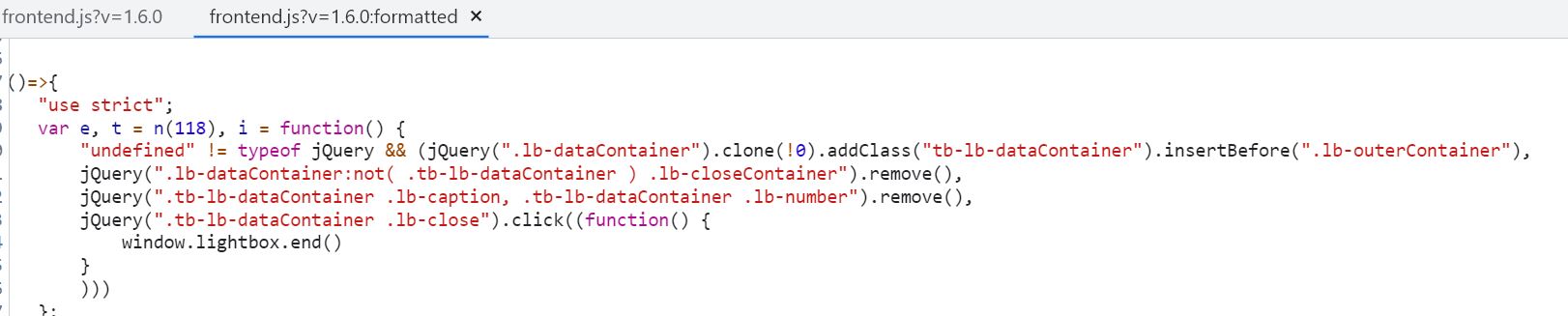
When creating a slider in Toolset Blocks the Lightbox shows a large amount of closing buttons. The issue seems to be that every time an XMLHttpRequest is done the lightbox appends a new ".lb-dataContainer" element without deleting the old one. After some debugging the specific code responsible seems to be in "toolset-blocks/vendor/toolset/blocks/public/js/frontend.js". See screenshot.
To reproduce the problem:
1. Create an WordPress environment
2. Install Toolset Blocks
3. Create a page with a Toolset Blocks Slider
4. View page
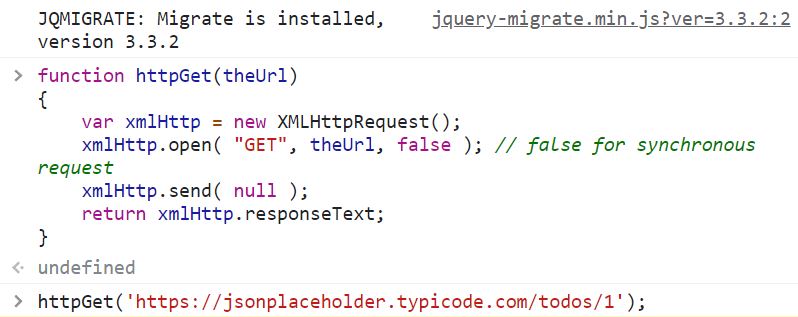
5. Make a XMLHttpRequest (or multiple) the endpoint doesn't matter. (see screenshot for the code I used while debugging)
6. Open Lightbox
Step 5 and 6 could also be the other way around.
This issue has been reported before but was closed: https://toolset.com/forums/topic/issue-with-image-slider-block-lightbox-is-showing-several-close-buttons/

Shane
Colaborador
Idiomas:
Inglés (English )
Zona horaria:
America/Jamaica (GMT-05:00)
Hi Martin,
Thank you for getting in touch.
This is a known issue and was previously reported by one of our team members. Unfortunately there isn't a solution at this time but i've added your ticket to the issue tracker as well so that I can get updates on the issue from our development team.
Once there is a fix/patch I will inform you.
Thanks,
Shane

Minesh
Colaborador
Idiomas:
Inglés (English )
Zona horaria:
Asia/Kolkata (GMT+05:30)
I would like to inform you that we just published new version for the following Toolset plugins:
- Toolset Types (3.6.0)
- Toolset Blocks (1.6.19) and Toolset Views (3.6.19)
- Toolset Maps (2.2.0)
- Toolset Forms (2.6.23)
- Toolset Access (2.9.3)
- Toolset Layouts (2.6.17)
Please check the following blog post for more details:
- https://toolset.com/2025/04/toolset-1-6-19-openstreetmap-integration/
Could you please update ALL Toolset plugins to it's latest officially released version. You can download the latest plugin release from your account's Downloads page:
=> https://toolset.com/account/downloads/
Alternatively, if your site is registered - You can install/update Toolset pluigins using the installer plugin:
=> https://toolset.com/faq/how-to-install-and-register-toolset/#automatic-installation-once-you-have-otgs-installer-plugin-installed

Minesh
Colaborador
Idiomas:
Inglés (English )
Zona horaria:
Asia/Kolkata (GMT+05:30)
I would like to inform you that we just published new version for the following Toolset plugins:
- Toolset Types (3.6.0)
- Toolset Blocks (1.6.19) and Toolset Views (3.6.19)
- Toolset Maps (2.2.0)
- Toolset Forms (2.6.23)
- Toolset Access (2.9.3)
- Toolset Layouts (2.6.17)
Please check the following blog post for more details:
- https://toolset.com/2025/04/toolset-1-6-19-openstreetmap-integration/
Could you please update ALL Toolset plugins to it's latest officially released version. You can download the latest plugin release from your account's Downloads page:
=> https://toolset.com/account/downloads/
Alternatively, if your site is registered - You can install/update Toolset pluigins using the installer plugin:
=> https://toolset.com/faq/how-to-install-and-register-toolset/#automatic-installation-once-you-have-otgs-installer-plugin-installed