I want to allow our customers add some SEO content on front end. We use Yoast but I did not find any Yoast fields available for Toolset Form for posts. How could we add Yoast fields or edit them by Toolset Form?
Hi Kirill,
Thank you for getting in touch.
You can edit the fields by following the instructions in the link below.
https://toolset.com/course-lesson/letting-toolset-edit-custom-fields-created-by-other-plugins/
This should allow you to place the yoast custom fields on your Forms.
Please let me know if this helps.
Thanks,
Shane
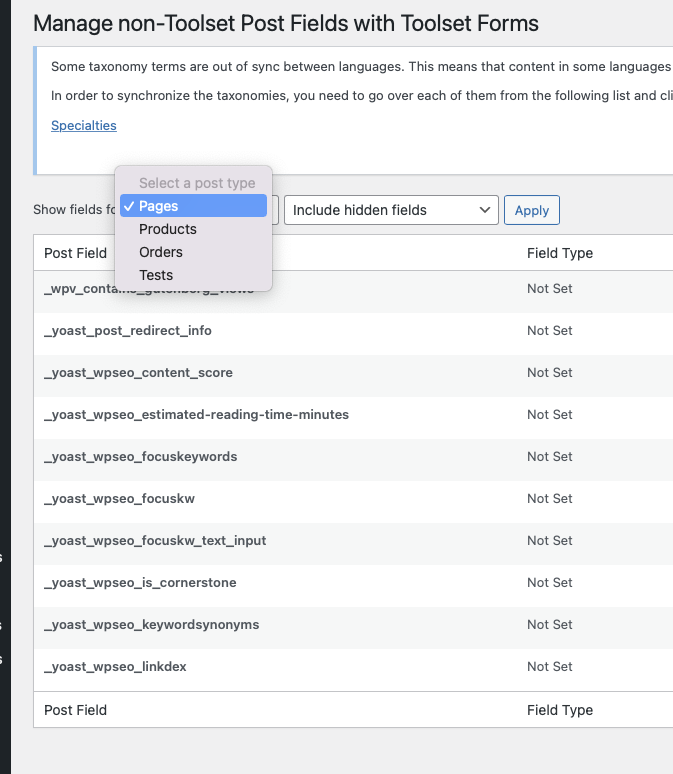
Thanks. Unfortunately I don't see posts (please see screenshot). Why it could be and how to fix it? I'm not sure what is "For a post type to be selectable here, it needs to be configured as public, publicly queryable and visible in the GUI." - there is no settings like this in Post post type.
Hi Kirill,
That is quite odd as it should be showing.
Would you mind allowing me to have admin access to the website so that I can have a more detailed look at this for you ?
I've enabled the private fields for your next response.
Thanks,
Shane
Hi Kirill,
I would like to have our 2nd tier team look at this one for us but would it be possible to perform testing on this site given that it is a staging site?
Secondly I may need to grab a copy of the site as well, would this be ok for me to do ?
Please let me know.
Thanks,
Shane
Hi Kirill,
I've escalated the ticket to our 2nd tier team for further debugging, however are you able to provide us with your server logs?
We would like to ensure that there isn't any errors in there that could be related to this. It should be noted as well that this issue doesn't occur on a fresh site and i'm able to select the default post type and find the Yoast fields.
Thanks,
Shane
Hi Shane,
I checked the logs, nothing looks related. Actually there is only one error for yesterday:
"
2021/11/18 15:21:22 [error] 26847#26847: *2991 upstream timed out (110: Connection timed out) while reading response header from upstream, client: 2605:a200:9500:596:44c7:a035:b776:5221, server: staging-sif.kinsta.cloud, request: "POST /wp-admin/admin-ajax.php HTTP/1.
0", upstream: "enlace oculto", host: "staging-sif.kinsta.cloud", referrer: "enlace oculto"
and no error for today (as I tried to access post fields again).
Hi Shane,
Do you have any update on this issue?
Hi Kirill,
Thank you for the patience. Our 2nd tier team has applied the following code to your site and you should now be seeing the Post option appear now.
toolset_snippet_security_check() or die( 'Direct access is not allowed' );

/**
 * Make all post types available on Forms screen to manage non-Types fields
 */
add_filter( 'option_wpcf-custom-types', 'ts_blank_cpt_option' );
function ts_blank_cpt_option( $option ){

    $screen = get_current_screen();

    if ( isset( $screen ) && $screen->id == 'toolset_page_CRED_Fields' ) {
        $option = false;
    }

    return $option;
}
Please let me know if this helps.
Thanks,
Shane
Hi Shane,
This is not clear there should I put this code. Then I try to put it to function.php it show a lot of errors.
Hi Kirill,
The code was already added to your site by our 2nd tier team. It was added to Toolset -> Settings -> Custom Code under the name blank_options
No need to re-add the code to the site.
Thanks,
Shane
Hi Shane!
The problem is that it was added to staging, so I have to add it to the production. In the same time it is not good that staging site is not working with critical error. The error is definitely related:
-----
2021/11/24 13:30:36 [error] 33653#33653: *17319 FastCGI sent in stderr: "PHP message: PHP Fatal error: Uncaught Error: Call to undefined function get_current_screen() in /www/sif_669/public/wp-content/toolset-customizations/debugging.php:10
Stack trace:
#0 /www/sif_669/public/wp-includes/class-wp-hook.php(305): ts_blank_cpt_option(Array)
#1 /www/sif_669/public/wp-includes/plugin.php(189): WP_Hook->apply_filters(Array, Array)
#2 /www/sif_669/public/wp-includes/option.php(225): apply_filters('option_wpcf-cus...', Array, 'wpcf-custom-typ...')
#3 /www/sif_669/public/wp-content/plugins/cred-frontend-editor/vendor/toolset/toolset-common/toolset-forms/bootstrap.php(278): get_option('wpcf-custom-typ...')
#4 /www/sif_669/public/wp-includes/class-wp-hook.php(303): WPToolset_Forms_Bootstrap->pre_get_posts(Object(WP_Query))
#5 /www/sif_669/public/wp-includes/class-wp-hook.php(327): WP_Hook->apply_filters(NULL, Array)
#6 /www/sif_669/public/wp-includes/plugin.php(518): WP_Hook->do_action(Array)
#7 /www/sif_669/public/wp-includes/class-wp-query.php(1784): do_action_ref_array('pre_g" while reading response header from upstream, client: 95.91.253.171, server: staging-sif.kinsta.cloud, request: "GET / HTTP/1.0", upstream: "enlace oculto:", host: "staging-sif.kinsta.cloud"
------
So it looks like you solve the backend issue, but crash the frontend.
Could you check it, please?
Hi Kirill,
This is happening because the code is set to run on the frontend as well.
On the Toolset custom code settings ensure that Front-end is not checked. I've done this on your staging site so let me know if everything is working well now.
Thanks,
Shane
Hi Shane,
I applied it to production site and run it. But nothing changed in terms of post type visibility in Form manageable fields - I see only 4 post types as before.
I could update staging site with my current production that you will check why it could be. Is it ok for you?